
HerdrDroid
Note: HerdrDroid is experimental software provided as is, with no warranty of any kind. It can type into and approve actions in the agents on your computer, so review what you send and use it at your own risk.
HerdrDroid is an Android app for keeping coding agents moving while you are away from the computer they run on. I run thirteen terminal agents side by side under herdr, as I describe in Herding Agents, and each of them can stop to ask a question, wait for an approval, or finish a long job while I am elsewhere. HerdrDroid lets me see which ones need me and answer them from my phone.
The app signs in to the computer over SSH, the same way you would from a laptop, and every tap becomes one herdr command there. Nothing is installed on the computer and no new network port is opened, because the app uses the SSH server that is already running. Your chats, settings and keys stay on the phone, sealed with keys in the Android Keystore, and the app sends no telemetry.
HerdrDroid is hosted on GitHub, where every release is published as an APK:
| HerdrDroid | Download the latest APK |
What It Does
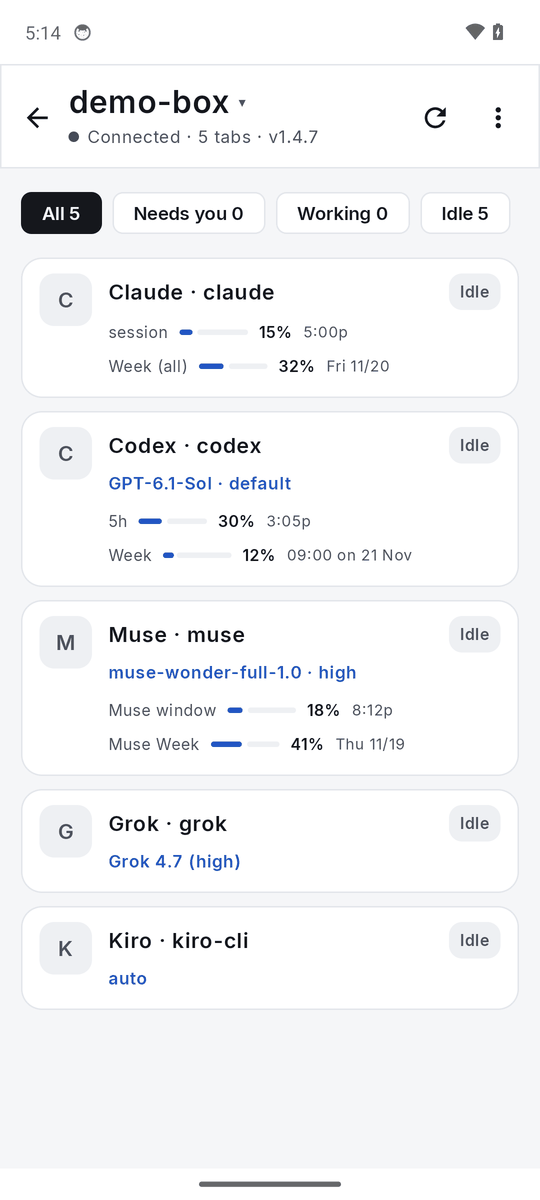
- Every agent at a glance. Each herdr pane appears as a card showing its agent, its folder, its status (Needs you, Working, Done or Idle), the model it runs and its usage. A pane that is waiting on you sorts to the top.
- Chats instead of terminal screens. For agents that keep a session log, the app reads that log and shows the conversation as a chat, with each tool call and its result. For the rest, it turns the terminal screen into a readable page, and the exact terminal is always one tap away.
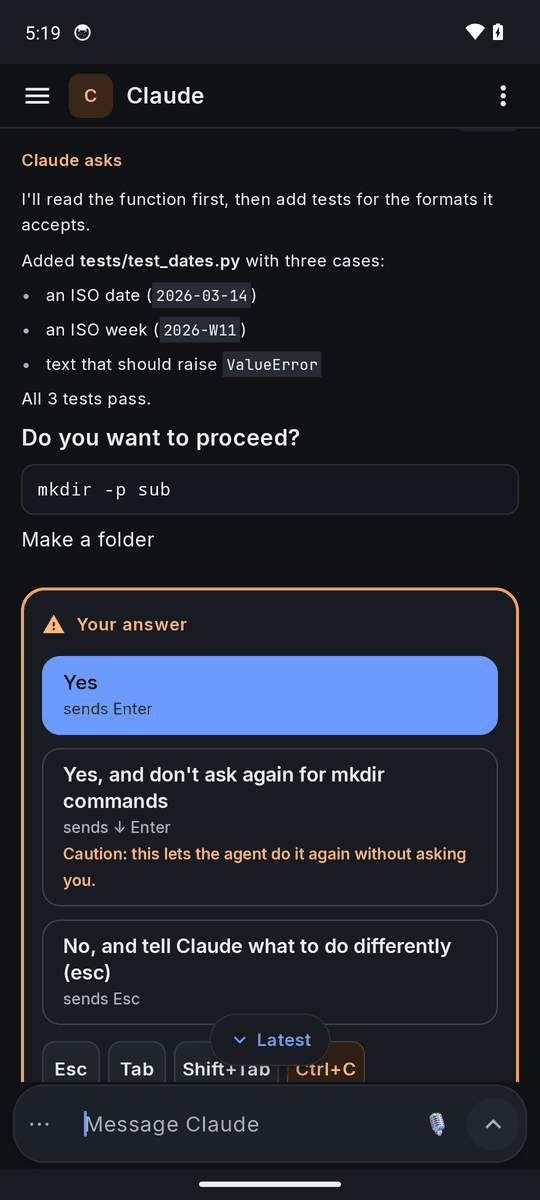
- Questions and approvals as cards. When an agent asks something, the question becomes a card with one button per answer. Each button says which keys it will send, and an answer that grants standing permission carries a caution.
- Usage limits. The app reads each agent’s own usage readout and shows how much of its session and weekly allowance is left, with the reset times.
- Safe sending. Before a message goes into a pane, the app checks whether someone is typing there at the computer. If so, it waits and sends the message once the line is clear, rather than typing over your work. It tells placeholder text, such as the grey suggestion in an empty prompt, apart from real typing by how the text is drawn.
HerdrDroid supports Claude Code, Codex, Grok, GitHub Copilot CLI, Antigravity, Kiro CLI, Mistral Vibe, pi, Oh My Pi, OpenCode, Hermes and Meta’s Muse Code. Any other pane, including a plain shell, still gets the terminal view and the keys.
What You Need
- An Android phone running Android 8.0 or later.
- A computer running herdr that the phone can reach over SSH, whether on your own network, through a VPN, or through SSH over a WebSocket.
- An account on that computer that can run
herdr, andpython3for the chat view.
Installing
HerdrDroid is installed from an APK rather than from an app store. Download the latest APK on the phone, open it, and allow your browser or file manager to install apps when Android asks. Every release is signed with the same key, so a newer version installs over an older one and keeps your servers, chats and settings.
The README covers first-time setup, the security model in detail, and screenshots of each screen in the light and dark themes.