CS374: Principles of Programming Languages - Lab: Finite Automata Simulators (15 Points)
Contents
Purpose, Task, and Criteria
Purpose: To build general simulators for deterministic finite automata (DFAs) and nondeterministic finite automata (NFAs) that read machine definitions from data files, so the theory beneath every lexer becomes a program you can run, and to trace the subset construction and Thompson's construction once by hand.
Task: Individually or with a partner, build DFA and NFA simulators that read machines from JSON, design one machine of each kind, and trace the subset construction and Thompson's construction by hand on small examples.
Criteria: I grade correct simulators that handle the stated edge cases, two annotated machine designs, and by-hand construction traces. The rubric below breaks this down in full.
Assignment Goals
The goals of this assignment are:
- To implement general DFA and NFA simulators over machine definitions loaded from JSON
- To design one DFA and one NFA for specified languages and encode them as data
- To trace the subset construction and Thompson's construction by hand on small examples
- To connect automata to the regular expressions and lexer of the surrounding course
Background Reading and References
Please refer to the following readings and examples offering templates to help get you started:
- Finite Automata Activity
- Grammars and the Chomsky Hierarchy Activity
- FSM Simulator (step a DFA, NFA, or epsilon-NFA one symbol at a time; it writes epsilon as $)
- FSM2Regex (convert a regular expression to an automaton and back)
- Automata Studio (NFA to DFA by subset construction with the full subset table, and DFA minimization)
The Assignment
In this lab you write two programs that run finite automata: a DFA simulator and an NFA simulator. Each one reads a machine from a JSON file, so a single program runs any machine you or I give it. These machines sit underneath every lexer, including the one you build next. You also design one DFA and one NFA, and you trace two classic constructions by hand. Parts 0 and 3 are paper work; Parts 1 and 2 are code.
Pair policy. You may work in pairs or alone. A pair can share one screen, or split the DFA and NFA halves and review each other’s work. Both partners submit the same ZIP, name each other in the writeup, and earn the same grade. This lab needs no individual-work certification. The reflection asks who did what instead.
Refresher on Finite Automata
This section defines every idea the lab uses and works an example of each, so this page is all you need to finish. The Finite Automata activity in the readings covers the same material if you want a second explanation. Read it before Part 0, and come back to it whenever a later step points here.
Finite automata in one paragraph
A finite automaton has a finite set of states and an alphabet of input symbols. One state is the start state, and some states are accepting states. A transition function \(\delta\) says where to go on each symbol. To run one, begin in the start state and read the input one symbol at a time, following one arrow per symbol. When the input runs out, accept if you are in an accepting state; otherwise reject. The empty string "" reads no symbols. It is accepted only when the start state is accepting.
DFA versus NFA
A DFA (deterministic finite automaton) has one arrow out of every state on every symbol. It never has a choice, so it is always in one state.
An NFA (nondeterministic finite automaton) relaxes both rules. A state may have several arrows on the same symbol, or none. It may also have ε-transitions (epsilon transitions): arrows the machine may follow without reading any input. An NFA accepts a string if any sequence of choices ends in an accepting state.
You do not have to guess which choice is right. Follow every choice at once, and keep track of the set of states the NFA could be in right now. We call that set the active set. Tracking it is how run_nfa works in Part 2, and it is also how the subset construction works in Part 3.
ε-closure: the free moves
An ε-transition costs no input. So if the NFA could be in state \(q\), it could also be in every state it can reach from \(q\) by ε-moves alone. The ε-closure of a set \(S\), written \(E(S)\), is \(S\) plus every state reachable from a state in \(S\) by zero or more ε-transitions. Because zero moves count, every state is in its own closure.
Example. Suppose the only ε-arrows are \(q_0 \xrightarrow{\varepsilon} q_1\) and \(q_1 \xrightarrow{\varepsilon} q_2\). Then \(E(\{q_0\}) = \{q_0, q_1, q_2\}\), \(E(\{q_1\}) = \{q_1, q_2\}\), and \(E(\{q_2\}) = \{q_2\}\). Closure follows arrows forward only, so \(q_0\) is not in \(E(\{q_1\})\).
One step of an NFA: the union, then the closure
Both run_nfa and the subset construction repeat one rule. If the active set is \(S\) and the next symbol is \(a\), the next active set is
The rule has two parts:
- Move, by taking a union. For every state \(q\) in \(S\), look up where \(q\) goes on \(a\). Each lookup gives a set, which may be empty. Take the union of all those sets. The result holds every state the NFA can reach on that one
afrom anywhere it might be now. - Close. Take the ε-closure of that union, because after reading
athe machine may also slide along free moves.
Remember it as move, then ε-close. If no state in \(S\) has an arrow on \(a\), the union is empty and so is its closure. The NFA is then stuck, and it rejects every string that begins this way. Close the start of a run, too. The first active set is \(E(\{\text{start}\})\), not \(\{\text{start}\}\).
Worked example 1, with no ε-moves: “ends in ab”. This NFA over {a, b} starts in q0 and accepts in q2. It has one choice to make: on a, q0 can stay where it is or guess that this a begins the final ab.
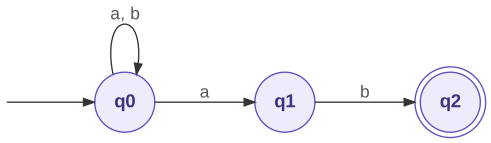
| state | on a |
on b |
|---|---|---|
| q0 | {q0, q1} | {q0} |
| q1 | ∅ | {q2} |
| q2 | ∅ | ∅ |
Run it on aab. The machine has no ε-arrows, so each closure leaves the set unchanged.
| Step | Union of the moves | Active set |
|---|---|---|
| start | (nothing read yet) | {q0} |
read a |
q0 → {q0, q1} | {q0, q1} |
read a |
q0 → {q0, q1} ∪ q1 → ∅ | {q0, q1} |
read b |
q0 → {q0} ∪ q1 → {q2} | {q0, q2} |
| end | {q0, q2} contains the accepting state q2 | accept |
Look closely at the last step. The active set {q0, q1} moves on b to \(\delta(q0, b) \cup \delta(q1, b) = \{q0\} \cup \{q2\} = \{q0, q2\}\). Each state in the set contributes its own targets, and the union collects them.
Worked example 2, with an ε-move: ab?. This NFA accepts an a, optionally followed by a b. It starts in q0 and accepts in q2. The ε-arrow from q1 to q2 makes the b optional.
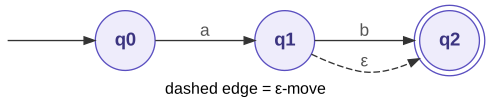
Run it on a:
| Step | Move | Close | Active set |
|---|---|---|---|
| start | (nothing read yet) | E({q0}) = {q0} | {q0} |
read a |
q0 → {q1} | E({q1}) = {q1, q2} | {q1, q2} |
| end | {q1, q2} contains q2 | accept |
Skip the closure after the move and the active set is {q1}, so a is wrongly rejected. A missing closure, at the start or after a move, is the most common bug in this lab.
The subset construction: the same step, done ahead of time
run_nfa computes active sets for one input string at a time. The subset construction, also called the powerset construction, computes every reachable active set in advance and turns those sets into a DFA. Each DFA state is one set of NFA states, called a powerset state. Its transition on a symbol is the step you just saw:
In words: a powerset state’s transition on a symbol is the ε-closure of the union of every state reachable on that symbol from the states in the set. The algorithm searches for those sets:
- The DFA’s start state is \(E(\{\text{start}\})\).
- Keep a list of powerset states you have found but not yet processed. To process a set \(S\), compute \(\delta_D(S, a)\) for every symbol \(a\) in the alphabet. If a result is a set you have not seen, it is a new powerset state; add it to the list.
- A powerset state accepts if it contains at least one accepting NFA state.
- Stop when you have processed every powerset state.
A result can be the empty set ∅. That is a real DFA state, called a dead state. It loops to itself on every symbol and never accepts. Give it a row in your table like any other state.
Worked example 1: “ends in ab,” from above.
| Set being processed | Symbol | Union of the moves | Result | New? |
|---|---|---|---|---|
| {q0} | a |
q0 → {q0, q1} | {q0, q1} | new |
| {q0} | b |
q0 → {q0} | {q0} | |
| {q0, q1} | a |
q0 → {q0, q1} ∪ q1 → ∅ | {q0, q1} | |
| {q0, q1} | b |
q0 → {q0} ∪ q1 → {q2} | {q0, q2} | new |
| {q0, q2} | a |
q0 → {q0, q1} ∪ q2 → ∅ | {q0, q1} | |
| {q0, q2} | b |
q0 → {q0} ∪ q2 → ∅ | {q0} |
Nothing is left to process, so the construction stops. Collecting the results gives the DFA:
| Powerset state | on a |
on b |
Accepting? |
|---|---|---|---|
| {q0} | {q0, q1} | {q0} | No |
| {q0, q1} | {q0, q1} | {q0, q2} | No |
| {q0, q2} | {q0, q1} | {q0} | Yes (contains q2) |
Three NFA states allow up to \(2^3 = 8\) subsets, but only three are reachable. You can read a meaning off each one. {q0} means no part of ab is in progress; {q0, q1} means the input just ended in a; {q0, q2} means it just ended in ab. Compare the aab trace above: every set it printed is a row of this table.
Worked example 2: ab?, from above, with closures and a dead state.
The start state is E({q0}) = {q0}.
| Set being processed | Symbol | Move | Close | New? |
|---|---|---|---|---|
| {q0} | a |
{q1} | {q1, q2} | new |
| {q0} | b |
∅ | ∅ | new (dead state) |
| {q1, q2} | a |
∅ | ∅ | |
| {q1, q2} | b |
{q2} | {q2} | new |
| {q2} | a |
∅ | ∅ | |
| {q2} | b |
∅ | ∅ | |
| ∅ | a |
∅ | ∅ | |
| ∅ | b |
∅ | ∅ |
| Powerset state | on a |
on b |
Accepting? |
|---|---|---|---|
| {q0} | {q1, q2} | ∅ | No |
| {q1, q2} | ∅ | {q2} | Yes |
| {q2} | ∅ | ∅ | Yes |
| ∅ | ∅ | ∅ | No |
Thompson’s construction: regex to NFA
Thompson’s construction builds an NFA from a regular expression. It follows fixed rules and needs no judgment, which is why lexer generators and regex engines can run it automatically.
Why it works. Every regular expression is built from single symbols with three operators: concatenation (AB, A then B), union (A|B, A or B), and star (A*, A zero or more times). The construction has one rule for a single symbol and one rule for each operator. You apply the rules from the inside of the expression outward, so the NFA is assembled the same way the regex was.
Why the result is an NFA. Union and star are choices. A|B means “take either branch,” and A* means “go around again, or stop.” An NFA states a choice directly, as two ε-arrows leaving one state, and the active-set method follows both arrows. Resolving every choice in advance is the subset construction’s job, not this one’s.
The rule every fragment obeys. Each fragment has one start state and one accepting state. No arrows enter its start, and none leave its accept. This rule lets fragments connect like plugs: to combine two fragments, you join one fragment’s accept to another’s start (or to a new state) with an ε-arrow. Once a fragment is wired into a larger one, its old accepting state stops accepting. In the finished NFA, only the outermost fragment’s accept state accepts.
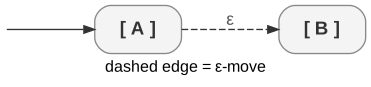
In the pictures below, [ A ] stands for a fragment you have already built for the sub-expression A. Its start is on the left and its accept is on the right.
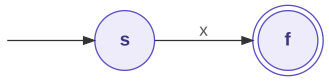
Rule 1: a single symbol x. Create two states and one arrow. The fragment accepts only the one-symbol string x.
Rule 2: concatenation AB. Join A’s accept to B’s start with one ε-arrow. The new fragment starts where A starts and accepts where B accepts, and it needs no new states. Once A has matched its part of the input, the machine slides into B for free, and B matches the rest.
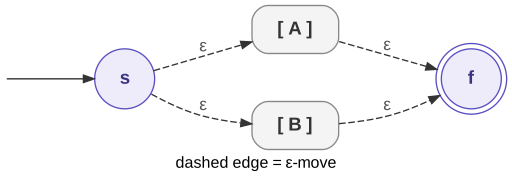
Rule 3: union A|B. Add a new start s with ε-arrows into both fragments. Add a new accept f with ε-arrows out of both. At s the machine would have to guess which branch the input follows. The active set follows both, and the branch that matches reaches f.
Rule 4: star A*. Add a new start s, a new accept f, and four ε-arrows.
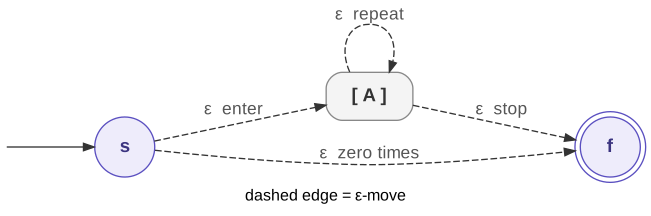
Each of the four arrows has one job:
| ε-arrow | its job |
|---|---|
s to A’s start |
enter A to match one repetition |
A’s accept to f |
stop after any number of repetitions |
| A’s accept back to A’s start | go around again for another repetition |
s straight to f |
match zero repetitions, so A* accepts the empty string |
Leave out the s-to-f arrow and A* becomes “one or more” (A+). Leave out the back arrow and it becomes “zero or one” (A?).
How to apply the rules. Start by reading the regex’s structure. Star binds tightest, then concatenation, then union, so ab*|c means (a(b*))|c. Build fragments for the single symbols first. Then apply each operator’s rule to fragments you have already built, working outward. Number the states in the order you create them, and keep those numbers when you reuse a fragment. A reader can then find every earlier fragment inside the final machine. Each rule adds at most two states, so the NFA has at most twice as many states as the regex has symbols and operators.
Worked example 1: (x|y)z, a union and then a concatenation.
| Step | Sub-expression | Rule | New states and arrows | Start, accept |
|---|---|---|---|---|
| 1 | x |
1 | 1 −x→ 2 | 1, 2 |
| 1 | y |
1 | 3 −y→ 4 | 3, 4 |
| 2 | x\|y |
3 | 5 −ε→ 1, 5 −ε→ 3, 2 −ε→ 6, 4 −ε→ 6 | 5, 6 |
| 3 | z |
1 | 7 −z→ 8 | 7, 8 |
| 4 | (x\|y)z |
2 | 6 −ε→ 7 | 5, 8 |
| 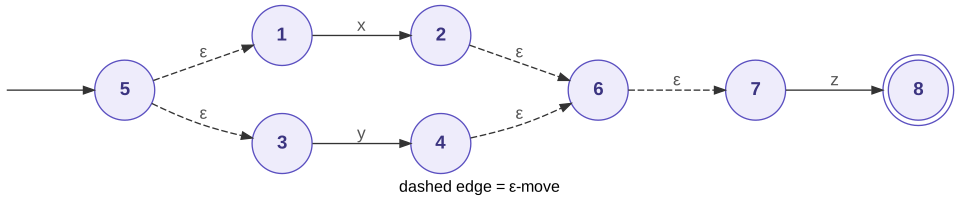 |
The finished NFA has eight states. It starts at 5 and accepts only at 8. States 2, 4, and 6 accepted in their own fragments, but they no longer do. Check it on yz with the active-set method: \(E(\{5\}) = \{5, 1, 3\}\); on y, move to \(\{4\}\) and close to \(\{4, 6, 7\}\); on z, move to \(\{8\}\), which accepts. Now try xy. After x the active set is \(\{2, 6, 7\}\). None of those states has a y arrow, so the set becomes empty and the NFA rejects xy.
Worked example 2: (ab)*, a concatenation and then a star.
| Step | Sub-expression | Rule | New states and arrows | Start, accept |
|---|---|---|---|---|
| 1 | a |
1 | 1 −a→ 2 | 1, 2 |
| 1 | b |
1 | 3 −b→ 4 | 3, 4 |
| 2 | ab |
2 | 2 −ε→ 3 | 1, 4 |
| 3 | (ab)* |
4 | 5 −ε→ 1 (enter), 4 −ε→ 6 (stop), 4 −ε→ 1 (repeat), 5 −ε→ 6 (zero times) | 5, 6 |
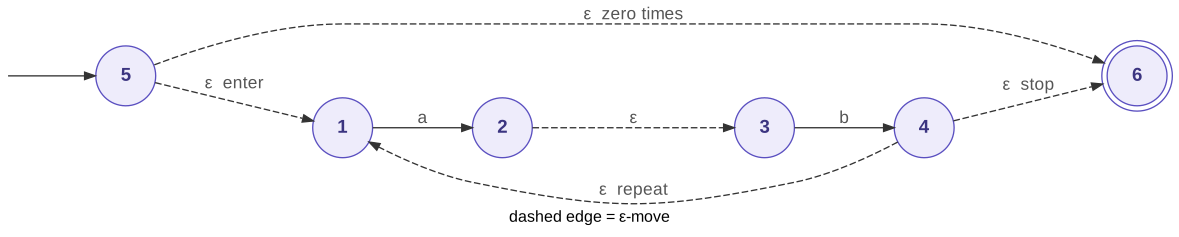
Trace three strings:
| String | Step | Move | Close | Active set |
|---|---|---|---|---|
"" |
start | E({5}) | {1, 5, 6}: contains 6, accept (zero repetitions) | |
abab |
start | E({5}) | {1, 5, 6} | |
read a |
{2} | E({2}) | {2, 3} | |
read b |
{4} | E({4}) | {1, 4, 6} (the repeat arrow puts 1 back in play) | |
read a |
{2} | E({2}) | {2, 3} | |
read b |
{4} | E({4}) | {1, 4, 6}: contains 6, accept | |
aba |
after the second a |
{2, 3}: no 6, reject |
A person would draw (ab)* with two states, so hand-drawn NFAs are often smaller than Thompson’s. The advantage of Thompson’s construction is that a program can follow it mechanically. The subset construction can tidy the result afterward.
Part 0: Before You Start - Regular Expressions and Finite Automata
Do this part on paper before you write any code. You may do it alone, even if you do the rest of the lab with a partner. A regular expression and a finite automaton are two ways to describe the same set of strings. Building both for one language is the fastest way to see that they agree.
Step 0.1: Write a Regular Expression and a Matching NFA
You write (on paper, then in writeup.md under a ## Part 0 heading): a regular expression, a drawn NFA, and four test strings. No code.
Example. An identifier is a letter followed by any number of letters or digits. Let L stand for any letter and D for any digit. The regex is L(L|D)*, and this two-state NFA accepts the same language:
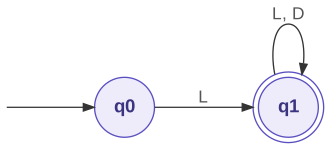
On x1, the machine moves from q0 to q1 on x and loops on 1, so it accepts. On 1x, q0 has no arrow for a digit, so it rejects. The regex agrees, because 1x does not start with a letter. Choose a different token class for your own work.
Do this.
- Pick a token class, such as floating-point literals, integer literals with an optional sign, or string literals.
- Write a regular expression for it.
- Draw an NFA that accepts the same language. Mark the start state with an incoming arrow and each accepting state with a double circle.
- Test both on two strings the class should accept and two it should not. The regex and the NFA must agree on all four.
Step 0.2: Convert a Small NFA to a DFA by Hand
You write (on paper, then in writeup.md under the same ## Part 0 heading): a partial subset-construction table and one accepted string. No code.
The subset construction makes one DFA state for each set of NFA states the machine could be in at once. The Refresher on Finite Automata explains it under The subset construction. You trace it in full in Part 3, so a short first pass now pays off twice.
Use this NFA over {a, b}. It accepts strings whose second-to-last symbol is a. It starts in q0, accepts in q2, and has no ε-moves. On each a, q0 may guess that this is the second-to-last symbol:
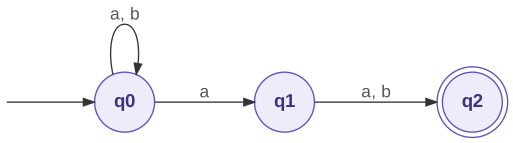
| state | on a |
on b |
|---|---|---|
| q0 | {q0, q1} | {q0} |
| q1 | {q2} | {q2} |
| q2 | ∅ | ∅ |
Here is the first row, worked, to show what each cell asks for. Start at {q0}. On a, the set holds only q0, and \(\delta(q0, a) = \{q0, q1\}\), so the cell is {q0, q1}. On b, \(\delta(q0, b) = \{q0\}\), so the cell is {q0}. The new set {q0, q1} is the next row to process. In that row, each cell is the union over both states. On a, for example, it is \(\delta(q0, a) \cup \delta(q1, a)\).
Do this.
- Copy the NFA and its table into your notes.
- Continue the subset construction from
{q0, q1}until no new sets appear, or for at least two or three input symbols. Write each DFA state as its full set of NFA states. For each cell, write the union you took, in the formq0 -> {...} ∪ q1 -> {...}.- Name one string the resulting DFA accepts.
- If the sets stopped being obvious at some step, circle that step and write one line about what got hard.
Bring to class. Bring your construction even if it stalled, with the stalling step marked. The stall is useful, because Part 2 has you automate that step. When you assemble your submission, put this page in
writeup.mdunder a Part 0 heading. A photo of the paper is fine.
Getting Started
You need Python 3.10 or newer, a terminal, and an editor such as VS Code. The lab uses only the standard library, so there is nothing to install. Keep your Part 0 work nearby so you have a machine in mind when you meet the JSON format. If the terminal is new to you, read the dev environment tutorial and the shell primer first. Together they cover every command on this page.
Check your Python version:
python3 --version
Python 3.11.4
Any version from 3.10 up works. If the shell cannot find python3, try python --version, and use whichever name works for the rest of this page. Next, create a project folder with a machines/ folder inside it, and move into it:
mkdir -p cs374-automata/machines
cd cs374-automata
Open the folder in your editor and create one empty file at the top level, writeup.md. It holds your Part 0 work, your test strings, your construction traces, and your reflection. You create the two Python files when the steps ask for them, and each machine goes in machines/ as its own JSON file. This table shows which file each step writes, so you always know where new code goes:
| Step | File you work in | What you do there |
|---|---|---|
| 0.1, 0.2 | writeup.md |
add your Part 0 paper work |
| 1.1 | dfa_core.py |
create a ten-line DFA runner, then leave it alone |
| 1.1, 1.4 | machines/even_ones.json, machines/ends_in_ab.json |
create the DFA machine files |
| 1.2.1 to 1.2.5 | simulator.py |
create the file, write the three checker helpers one at a time, then integrate them into the loader |
| 1.3.1 to 1.3.4 | simulator.py |
add run_dfa one rule at a time, then main |
| 2.1, 2.2, 2.4 | machines/ends_in_ab_nfa.json, machines/eps_cycle.json, machines/contains_aa.json |
create the NFA machine files |
| 2.2 | simulator.py |
add eps_closure |
| 2.3.1, 2.3.2 | simulator.py |
add the nfa_move helper, then integrate it with eps_closure into run_nfa |
| 3.1 to 3.3 | writeup.md |
add the construction traces and the lexer paragraph |
Time budget. This lab follows the class material on regular expressions and finite automata. The course schedule has the assigned and due dates. Plan about three hours (with your partner, if you have one) for Parts 1 and 2, and about an hour for the paper work in Parts 0 and 3. Write the reflection as you go, not at the end.
- On assignment: the loader and DFA simulator work on the provided machines.
- Midpoint: the NFA simulator and epsilon-closure work, and both designed machines are encoded and tested.
- Due date: the construction traces and writeup are assembled and the ZIP is submitted.
Part 1: DFA Simulation and Design
Step 1.1: Read the Machine Format and Encode the Parity Machine
Every machine is a JSON (JavaScript Object Notation) file with these keys:
| Key | Type | Meaning |
|---|---|---|
states |
list of strings | all state names |
alphabet |
list of strings | all input symbols (each a single character) |
start |
string | the initial state |
accept |
list of strings | the accepting states |
delta |
object | transition function |
For a DFA, delta is a nested object. delta[state][symbol] gives the next state, and the object must contain every (state, symbol) pair over the alphabet.
Here is the two-state parity machine for “even number of 1s,” first as a diagram and then as the JSON you type. In the diagram, the arrow from nowhere marks the start state, a double circle marks an accepting state, and each arrow carries the symbol that triggers it.
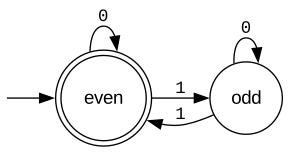
{
  "states": ["even", "odd"],
  "alphabet": ["0", "1"],
  "start": "even",
  "accept": ["even"],
  "delta": {
    "even": {"0": "even", "1": "odd"},
    "odd":  {"0": "odd",  "1": "even"}
  }
}
Each arrow in the diagram is one entry in delta. The 1 arrow from even to odd, for example, is the "1": "odd" inside "even". The double circle is the accept list, and the arrow from nowhere is the start key. Save the JSON as machines/even_ones.json. Then trace "0110" and "100" through the diagram by hand before you trust the program:
| String | States visited | Result |
|---|---|---|
0110 |
even → even → odd → even → even | accept |
100 |
even → odd → odd → odd | reject |
Before You Code: How a DFA Lives in Python
Every program in this lab works on the same Python objects, so meet them here, before you write any of it. When json.load reads the file above, each JSON object becomes a Python dictionary (dict) and each JSON list becomes a Python list. The machine is therefore one dictionary with five keys, and the moves sit in machine["delta"], which is a dictionary of dictionaries.
Finding the next state takes two lookups, one per level. The first picks the row for the current state, and the second picks the arrow for the symbol:
| In the diagram | In the JSON | In Python | Value |
|---|---|---|---|
the row of arrows out of even |
"even": {"0": "even", "1": "odd"} |
delta["even"] |
{'0': 'even', '1': 'odd'} |
the arrow out of even on 1 |
"1": "odd" inside "even" |
delta["even"]["1"] |
'odd' |
| the next state, in general | delta[state][symbol] |
\(\delta(q, a)\) |
Two more operations cover the rest of the DFA work:
- Looking up a key that may be missing.
delta["happy"]raises aKeyError, because there is no state namedhappy.delta.get("happy")returnsNoneinstead, anddelta.get("happy", {})returns the default you supply, here an empty dictionary. You use.getin the loader (Step 1.2), whose job is to find missing pairs and report them. You use plain[...]inrun_dfa(Step 1.3), because by then the loader has proved that every pair exists. - Testing membership.
state in machine["accept"]asks whether a state accepts, andsymbol in machine["alphabet"]asks whether a symbol is legal. Both are lists, which is fine for machines this small. Turning them into sets withset(...)makes the test faster on large machines, and that change is optional.
To see all of this before you rely on it, save the lines below as explore_dfa.py, a scratch file you do not submit, and run python3 explore_dfa.py from inside cs374-automata:
import json

with open("machines/even_ones.json") as f:
    machine = json.load(f)
delta = machine["delta"]

print(type(machine).__name__, sorted(machine))  # a dict, and its five keys
print(delta["even"])                            # the row for state even
print(delta["even"]["1"])                       # one arrow: even on 1
row = delta["even"]
print(row["0"])                                 # the same idea, in two steps
print(delta.get("happy"))                       # no such state: None, not a crash
print(delta.get("happy", {}).get("1"))          # missing row, then missing arrow
print("even" in machine["accept"], "2" in machine["alphabet"])
You should see.
dict ['accept', 'alphabet', 'delta', 'start', 'states']
{'0': 'even', '1': 'odd'}
odd
even
None
None
True False
Predict before you move on: what does
delta["odd"]["1"]print, and which arrow in the diagram is it?
Start with this one machine, not with the full simulator. The smallest program that runs it is about ten lines long, and you write it now in its own file, dfa_core.py. Every later step builds on the same idea, so you see it work in its simplest form first.
You write: machines/even_ones.json (above) and a new file, dfa_core.py.
You run: python3 dfa_core.py 0110 and python3 dfa_core.py 100.
Write dfa_core.py one piece at a time. Each piece of the program matches one part of the diagram, so read the sentence beside each piece before you type it.
-
Bring in the two modules you need.
jsonreads the machine file, andsysgives you the input string from the command line.import json import sys -
Load the machine.
json.loadturns the file into a Python dictionary, somachine["start"],machine["accept"], andmachine["delta"]are the keys you saw in the table above.with open("machines/even_ones.json") as f: machine = json.load(f) -
Put the machine in its start state. This line is the arrow from nowhere in the diagram.
state = machine["start"] -
Read the input one symbol at a time.
sys.argv[1]is the first word you type after the program name, so inpython3 dfa_core.py 0110it is the string"0110", and looping over a string gives one character per pass.for symbol in sys.argv[1]: -
Inside the loop, follow one arrow.
machine["delta"][state]is the row for the current state, and[symbol]picks the arrow for this symbol. This line is the transition function \(\delta(q, a)\) written in Python. The rest of the file loads the machine and reports the result.state = machine["delta"][state][symbol] -
After the loop, check for a double circle. The input has run out, so the machine accepts exactly when the state it ended in is in the
acceptlist.if state in machine["accept"]: print("accept") else: print("reject")
Put together, the whole file is eleven lines:
import json
import sys
with open("machines/even_ones.json") as f:
    machine = json.load(f)
state = machine["start"]
for symbol in sys.argv[1]:
state = machine["delta"][state][symbol]
if state in machine["accept"]:
    print("accept")
else:
    print("reject")
Do this.
- Type
dfa_core.pypiece by piece as shown above, and save it incs374-automata, next to themachines/folder.- From inside
cs374-automata, runpython3 dfa_core.py 0110and thenpython3 dfa_core.py 100.- Predict before you run it: what should
python3 dfa_core.py ""print, and why? Run it and check.
You should see.
accept, thenreject, matching the hand traces above. The empty string printsaccept, because the loop never runs and the machine stays ineven, which accepts.
Watch it run (optional). Add
print(symbol, "->", state)as a second line inside the loop, indented to match the line above it. Runpython3 dfa_core.py 0110again. The four lines it prints show each symbol and the state it led to, which is the “States visited” column of the trace table after the start state. Remove the line when you are done, or keep it; either is fine.
If it fails.
FileNotFoundError: you ran from a different folder.cdintocs374-automataand try again.JSONDecodeError: the JSON file has a missing comma or quote, and the message names the line.IndexError: list index out of range: you forgot the input string. Type it after the program name.KeyError: '2': you typed a symbol the machine does not know. This program has no checks; Step 1.3 adds them.
dfa_core.py is now finished. Leave it as it is, because you submit it. It works for one machine whose path is written into the program, and it crashes on bad input. The rest of Part 1 fixes both problems in a new file, simulator.py.
Step 1.2: Write the Loader
A wrong machine file is the most common bug in this lab. Your loader checks the file once, up front, and reports every problem at the same time. That saves you from chasing a KeyError deep inside the simulator.
You write: a new file, simulator.py, containing MachineError, is_nfa, three small checker helpers, and load_machine. Do not edit dfa_core.py.
You run: a one-line check after each helper, then python3 -c "import simulator; simulator.load_machine('machines/even_ones.json')", then the same command on a broken file.
load_machine(path) reads a JSON file and checks that the start state, the accept states, and every transition refer only to declared states and alphabet symbols. It collects every validation error in a list, then raises one MachineError that lists them, one per line. It does not stop at the first error. It accepts both delta shapes. A DFA’s delta is an object of objects. An NFA’s delta (Part 2) has "state,symbol" keys with list values, and the symbol half may be the special word eps. The check must let eps through for an NFA and reject every other symbol outside the alphabet.
That is several separate checks, so you write each check as its own small helper and test it on its own. Every helper follows one pattern. It starts an empty list, tests one kind of condition, and when the condition fails, appends a sentence that names the bad value. It returns the list and never raises. Word your messages like the expected output below, so you can compare yours line by line. Step 1.2.5 then integrates the helpers into load_machine, which joins their lists and raises once, so one run reports every problem.
Before you start, save this deliberately broken machine as machines/broken.json. It has a misspelled start state, a misspelled accept state, and no arrow out of odd on 1. It is a test file, and you do not need to submit it. Each helper’s check runs on it.
{
  "states": ["even", "odd"],
  "alphabet": ["0", "1"],
  "start": "evn",
  "accept": ["od"],
  "delta": {
    "even": {"0": "even", "1": "odd"},
    "odd":  {"0": "odd"}
  }
}
The helpers take a machine that is already a dictionary, so their checks load the JSON with json.load directly. Only load_machine opens files itself.
Step 1.2.1: MachineError and is_nfa
Do this. Create a new file,
simulator.py, next todfa_core.py. Type in the lines below, then write the body ofis_nfafrom its# Stepcomments.
import json
import sys


class MachineError(Exception):
    """Raised by load_machine with every validation problem listed at once."""


def is_nfa(machine):
    """Return True if machine is an NFA and False if it is a DFA."""
    # Step 1: Look at the values stored in machine["delta"].  A DFA's values
    #         are dictionaries, one row per state.  An NFA's values are lists
    #         of target states (Part 2).
    # Step 2: Return True if at least one of those values is a list, and
    #         False otherwise.
    ...
| Step | How to think about it |
|---|---|
is_nfa |
You only need to know whether some value is a list. isinstance(value, list) answers that for one value, and any(...) asks it of all of them at once. Part 2 is the first time it returns True. |
python3 -c "import json, simulator as s; print(s.is_nfa(json.load(open('machines/even_ones.json'))))"
You should see.
False: the parity machine is a DFA.
Step 1.2.2: Check the start and accept states
Do this. Add the helper below
is_nfa, write its body, and run the check.
def check_start_and_accept(machine, states):
    """Return a list of error sentences about the start and accept states (empty if none)."""
    # Step 1: Start an empty list, errors.
    # Step 2: If the start state is not in states (the set of declared states),
    #         append an error that names it.
    # Step 3: For each accept state that is not in states, append an error
    #         that names it.
    # Step 4: Return errors.
    ...
| Step | How to think about it |
|---|---|
| start and accept (Steps 2 and 3) | Membership in the set of declared states is the whole test. Inside an f-string, !r prints a value with quotes around it, so a stray space or a misspelling is easy to see. |
python3 -c "import json, simulator as s; m = json.load(open('machines/broken.json')); print(s.check_start_and_accept(m, set(m['states'])))"
You should see. A list of two sentences, one per misspelling. Your wording may differ:
["start state 'evn' is not a declared state", "accept state 'od' is not a declared state"]
Step 1.2.3: Check a DFA’s transitions
Do this. Add the helper below, write its body, and run the check.
def check_dfa_delta(machine, states, alphabet):
    """Return a list of error sentences about a DFA's delta (empty if none)."""
    # Step 1: Start an empty list, errors.
    # Step 2: For every declared state and every alphabet symbol, the pair must
    #         appear in delta, and its target must be a declared state.  A
    #         missing pair and an undeclared target are two different errors.
    # Step 3: Return errors.
    ...
| Step | How to think about it |
|---|---|
| DFA pairs (Step 2) | Loop over the declared states and the alphabet, not over the keys of delta. A row that is missing from delta is exactly what you are looking for, and a loop over delta would never visit it. dict.get with a default never crashes: a missing row can default to an empty dictionary, and a missing symbol then gives None. None means the pair is missing, so name both the state and the symbol. Otherwise, check that the target is declared. |
python3 -c "import json, simulator as s; m = json.load(open('machines/broken.json')); print(s.check_dfa_delta(m, set(m['states']), set(m['alphabet'])))"
You should see.
["missing transition for state 'odd' on symbol '1'"]Run the same command on
machines/even_ones.jsonas well. It prints[], because the parity machine has every pair.
Step 1.2.4: Check an NFA’s transitions
Do this. Add the helper below and write its body.
def check_nfa_delta(machine, states, alphabet):
    """Return a list of error sentences about an NFA's delta (empty if none)."""
    # Step 1: Start an empty list, errors.
    # Step 2: Check every "state,symbol" key.  Its state half must be declared.
    #         Its symbol half must be in the alphabet or be the word "eps".
    #         Every target in its list must be declared.
    # Step 3: Return errors.
    ...
| Step | How to think about it |
|---|---|
| NFA keys (Step 2) | Visit each key together with its list of targets; .items() gives you both. Each key is one string, so split it at the comma into its state half and its symbol half. str.partition or str.split both work. The symbol test has two ways to pass: in the alphabet, or the word eps. |
You cannot test this helper until Part 2 gives you an NFA file. Write it now anyway, because Part 2 relies on it.
Step 1.2.5: Integrate the checks into load_machine
Do this. Add
load_machinebelow the three helpers and write its body from its# Stepcomments. Each check is now one call.
def load_machine(path):
    """Read the JSON machine at path, check it, and return it as a dict.

    Raise one MachineError that lists every problem, one per line.
    """
    # Step 1: Open the file at path and parse it into a dictionary, machine.
    # Step 2: Build a set of the declared states and a set of the alphabet
    #         symbols, so each check is a quick membership test.
    # Step 3: Start the list errors with what check_start_and_accept returns.
    # Step 4: If is_nfa(machine) is true, add what check_nfa_delta returns.
    #         Otherwise the machine is a DFA: add what check_dfa_delta returns.
    # Step 5: If errors is not empty, raise one MachineError whose message is
    #         every error joined into one string, one per line.  Otherwise,
    #         return machine.
    ...
| Step | How to think about it |
|---|---|
| combine (Steps 3 and 4) | Each helper returns a list, and + or list.extend joins two lists. Nothing raises until Step 5. |
| raise once (Step 5) | An empty list is false in an if. str.join with a newline turns the list into one message with one problem per line. |
simulator.py has no command line yet, so you test it by importing it. Test the loader on the good file first:
python3 -c "import simulator; simulator.load_machine('machines/even_ones.json')"
You should see. Nothing. Silence means the file passed.
Now check that the loader reports every problem at once, not just the first, on the broken machine you saved at the start of this step:
python3 -c "import simulator; simulator.load_machine('machines/broken.json')"
You should see. A traceback that ends with one
MachineErrorlisting all three problems, one per line. Your wording may differ, but every problem must appear:simulator.MachineError: start state 'evn' is not a declared state accept state 'od' is not a declared state missing transition for state 'odd' on symbol '1'If only the first line appears, you raised the error inside a check instead of appending to
errorsand raising once at the end.
Step 1.3: Write run_dfa and the Command Line
dfa_core.py crashes on an unknown symbol, and it has the machine path written into the program. This step fixes both problems in simulator.py and adds trace mode. The loop inside run_dfa is the same loop you wrote in Step 1.1; the new lines are the checks around it.
You write: run_dfa and main in simulator.py, below load_machine.
You run: a one-line check after each piece of run_dfa, then python3 simulator.py machines/even_ones.json 0110 --trace, plus the two other commands at the end of this step.
run_dfa(machine, s, trace=False) -> bool must follow these rules:
- A symbol in
sthat is not in the alphabet causes an immediate reject. Print a reason; do not crash. - The empty string
""is valid input. It tests whether the start state accepts. - With
traceon, print the current state after each symbol.
You build it in three passes, one rule at a time, and check each pass before you add the next. Then Step 1.3.4 adds main and runs the whole program. Here is the finished skeleton, so you can see where each pass goes. Add it below the loader, and fill in the # Step comments in the order the sub-steps give; delete the ... when the body is complete.
def run_dfa(machine, s, trace=False):
    """Run the DFA on the string s.  Return True to accept, False to reject."""
    # Step 1: Put the machine in its start state.
    # Step 2: If trace is on, print "start: " and that state, as in
    #         "start: even".
    # Step 3: Read s one symbol at a time.  For each symbol:
    #   3a: If the symbol is not in the alphabet, print the reason, as in
    #       "reject: symbol '2' is not in the alphabet", and return False.
    #   3b: Follow one arrow to the next state.
    #   3c: If trace is on, print the symbol and the new state, as in
    #       "read 1 -> odd".
    # Step 4: After the loop, return whether the final state accepts.
    ...
Step 1.3.1: The core loop (Steps 1, 3b, and 4)
Steps 1, 3b, and 4 are the loop you already wrote in dfa_core.py. Write them first, leaving 2, 3a, and 3c for the next two passes.
| Step | How to think about it |
|---|---|
| move (3b) | Use the same two lookups as dfa_core.py: the row for the current state, then the arrow for the symbol. Plain [...] is safe here, because the loader already proved that every pair exists. Before You Code: How a DFA Lives in Python in Step 1.1 shows the two lookups. |
| empty string | You need no special case. The loop never runs, so Step 4 tests the start state. |
python3 -c "import simulator as s; m = s.load_machine('machines/even_ones.json'); print(s.run_dfa(m, '0110'), s.run_dfa(m, '100'), s.run_dfa(m, ''))"
You should see.
True False True: the verdictsdfa_core.pygave for0110,100, and the empty string you predicted in Step 1.1, now as return values instead of printed words.
Step 1.3.2: Reject an unknown symbol (Step 3a)
| Step | How to think about it |
|---|---|
| unknown symbol (3a) | Check before you move, not after. Moving on an unknown symbol is the KeyError that crashed dfa_core.py. The reason has quotes around the symbol, which !r in an f-string gives you. Return right away; main prints the final reject. |
python3 -c "import simulator as s; m = s.load_machine('machines/even_ones.json'); print(s.run_dfa(m, '0120'))"
You should see. The reason, then
False, and no traceback:reject: symbol '2' is not in the alphabet False
Step 1.3.3: Add the trace (Steps 2 and 3c)
| Step | How to think about it |
|---|---|
| trace (2 and 3c) | Print after the move, so each line shows the state the symbol led to. This line has no quotes around the symbol or the state. |
python3 -c "import simulator as s; m = s.load_machine('machines/even_ones.json'); print(s.run_dfa(m, '01', trace=True))"
You should see.
start: even
read 0 -> even
read 1 -> odd
False
Step 1.3.4: Integrate: add main and run the program
Do this.
- Add a
mainthat takes the machine path and the input string from the command line and honors a--traceflag.mainand theif __name__ == "__main__":lines go last in the file, so every function they call is defined above them.- Type
mainexactly as shown; it is complete.
def main(argv):
    # Usage: python3 simulator.py <machine.json> <string> [--trace]
    trace = "--trace" in argv
    args = [a for a in argv if a != "--trace"]
    machine = load_machine(args[0])
    s = args[1] if len(args) > 1 else ""
    run = run_nfa if is_nfa(machine) else run_dfa   # run_nfa arrives in Part 2
    print("accept" if run(machine, s, trace) else "reject")


if __name__ == "__main__":
    main(sys.argv[1:])
main mentions run_nfa, which you do not write until Part 2. The line still works for a DFA, because Python evaluates only the branch of run_nfa if is_nfa(machine) else run_dfa that it takes. When you finish this step, simulator.py holds these pieces, from top to bottom:
import json, import sys
class MachineError          (Step 1.2.1)
def is_nfa                  (Step 1.2.1)
def check_start_and_accept  (Step 1.2.2)
def check_dfa_delta         (Step 1.2.3)
def check_nfa_delta         (Step 1.2.4)
def load_machine            (Step 1.2.5)
def run_dfa                 (Steps 1.3.1 to 1.3.3)
def main                    (Step 1.3.4)
if __name__ == "__main__"   (Step 1.3.4, always last)
Test all three rules:
python3 simulator.py machines/even_ones.json 0110 --trace
python3 simulator.py machines/even_ones.json ""
python3 simulator.py machines/even_ones.json 0120
You should see. For the first command, one state per symbol and then the verdict:
start: even
read 0 -> even
read 1 -> odd
read 1 -> even
read 0 -> even
accept
For the empty string,
acceptalone, because the start stateevenaccepts. For the third command, a one-line reason such asreject: symbol '2' is not in the alphabet, thenreject, and no traceback.
Checkpoint. Test the parity machine on at least four strings it accepts and four it rejects. Record each string and its result in
writeup.mdunder a heading for the machine.
Step 1.4: Design the Ends-in-ab DFA
To design a DFA, decide what each state must remember. For this language the question is short: how much of the suffix ab has the machine just seen? The parity machine shows the method. Each of its two states stands for one fact about the input so far (“even number of 1s” or “odd”), and each arrow says how one more symbol changes that fact. Do the same here, with one state for each answer to “how much of ab have I just seen?” Every state needs an arrow on both a and b. The subset-construction table for the “ends in ab” NFA in the Refresher on Finite Automata is one correct answer. Try to design yours without looking, then compare.
Do this.
- Design a DFA for Ends in ab: strings over
{a, b}that end with the suffixab.- Draw it on paper first, then encode it as
machines/ends_in_ab.jsonin the same format as the parity machine.- In
writeup.md, annotate each state with one sentence about what it remembers about the input so far.- Test at least four strings it accepts and four it rejects, and record them next to the state annotations.
You write: machines/ends_in_ab.json, plus a heading for this machine in writeup.md with your state annotations and test strings. No Python changes; simulator.py already runs any DFA.
You run: the three commands below, then your own eight test strings.
Worked example: "aab" -> accept; "ba" -> reject; "ab" -> accept; "" -> reject. Hint: you need at least three states. You can start from this skeleton. The state names are a suggestion, one for each answer to “how much of ab have I just seen?”, and you may rename them. Replace each "TODO" with a state name, and decide which state or states go in accept:
{
  "states": ["none", "a", "ab"],
  "alphabet": ["a", "b"],
  "start": "none",
  "accept": ["TODO"],
  "delta": {
    "none": {"a": "TODO", "b": "TODO"},
    "a":    {"a": "TODO", "b": "TODO"},
    "ab":   {"a": "TODO", "b": "TODO"}
  }
}
Your loader catches any "TODO" you forget to replace, because "TODO" is not a declared state.
python3 simulator.py machines/ends_in_ab.json aab
python3 simulator.py machines/ends_in_ab.json ba
python3 simulator.py machines/ends_in_ab.json ""
You should see.
accept,reject,reject. If the empty string accepts, you marked the start state as accepting. The empty string does not end inab.
If it fails.
MachineErrornaming a missing (state, symbol) pair: a DFA needs an arrow out of every state on bothaandb, including the “just sawab” state."abb"accepts: afterab, readingbmust forget the suffix entirely, not step back one state."aab"rejects: aftera, anotheramust stay in the “just sawa” state, because the neweracould still start the suffix.
Part 2: NFA Simulation and Design
Step 2.1: Read the NFA Machine Format
For an NFA, delta maps "state,symbol" string keys to lists of states. The special symbol "eps" marks an ε-transition, a move the machine may take without reading input. A state may have any number of targets for a symbol, including none. The other keys work as they do for a DFA. Do not list eps in alphabet: it labels a transition, and it is not an input symbol.
Watch it run. The FSM Simulator steps a DFA, NFA, or ε-NFA one input symbol at a time and highlights the active set, the same set your
run_nfacomputes. Its format differs from ours in two ways. It writes ε as$where our JSON writeseps, and it lists transitions asq0:a>q0,q1instead of JSON keys.
Here is part of an NFA as a diagram and then as JSON. The fragment does not say which states accept, so no state has a double circle.
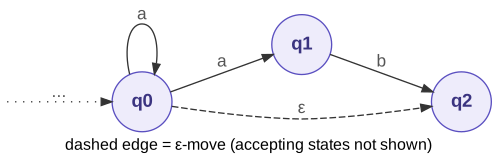
"delta": {
  "q0,a": ["q0", "q1"],
  "q0,eps": ["q2"],
  "q1,b": ["q2"]
}
The a arrows out of q0 go two ways, so "q0,a" lists two targets. That is the nondeterminism. Pairs with no arrow, such as q1 on a or q2 on anything, have no key. Read transitions with machine["delta"].get(key, []), so a missing key means “no moves” and does not raise a KeyError.
Before you write any NFA code, encode an NFA whose behavior you already know, so you have something to test against. The “ends in ab” NFA in the Refresher on Finite Automata has a transition table and a worked trace of aab, and Step 2.3 checks your run_nfa against that trace.
You write: machines/ends_in_ab_nfa.json. It is a test file, and you do not need to submit it.
You run: python3 -c "import simulator; simulator.load_machine('machines/ends_in_ab_nfa.json')"
Do this.
- Start from the JSON below. The first key,
"q0,a", is done for you; it is the{q0, q1}cell in rowq0, columna, of the table in the Refresher on Finite Automata.- Add one key for each other non-empty cell of that table. A cell that shows ∅ gets no key.
- Run the loader command. Silence means the file passed, and it also means the NFA branch of your loader accepts a correct file.
{
  "states": ["q0", "q1", "q2"],
  "alphabet": ["a", "b"],
  "start": "q0",
  "accept": ["q2"],
  "delta": {
    "q0,a": ["q0", "q1"]
  }
}
If it fails. A
MachineErrorabout a symbol such as'a"'or' b'usually means a stray quote or space inside a key. Each key is exactly a state, a comma, and a symbol, with no spaces. When you finish, the file has three keys.
Before You Code: How an NFA Lives in Python
An NFA changes two things about the Python objects you used for the DFA. Its moves are looked up by one string key instead of two nested keys, and the machine is in a set of states instead of one state.
Moves, keyed by a string pair. You build the key from a state and a symbol with an f-string, f"{state},{symbol}", so q0 on a becomes the key "q0,a". The value is a list, because one label can lead to several states. A pair with no arrow has no key at all, so you read moves with delta.get(key, []). A missing key then reads as “no moves,” an empty list, and the loop that uses it simply does nothing.
ε-moves use the same kind of key. An ε-arrow from q1 is stored under "q1,eps", and you read it with delta.get(f"{state},eps", []), exactly like any other move. eps never goes in alphabet, because the alphabet lists the symbols a string can contain, and no input string ever contains an ε.
Several states at once: a Python set. The active set is a Python set, and each property of a set matches something the NFA needs:
| The NFA needs | A Python set gives |
In code |
|---|---|---|
| each state listed once, even if two arrows reach it | no duplicates | {"q2", "q2"} == {"q2"} |
{q0, q1} and {q1, q0} to be the same set |
order does not matter | {"q1", "q0"} == {"q0", "q1"} |
| the union of every active state’s moves | update adds a whole list at once |
moved.update(targets) |
| “is any accepting state active?” | fast membership | "q2" in active |
One pitfall: {} is an empty dictionary, not an empty set. Write an empty set as set().
Why eps_closure returns a frozenset. A set can change after you build it, so Python will not let you put one inside another set or use one as a dictionary key. A frozenset holds the same states and cannot change, so it can go in both places. You need that in Part 3, where each row of the subset-construction table is a set of NFA states, and you have to ask “have I seen this set before?” Python compares frozensets by their contents, so the order you wrote the states in never matters.
To see these pieces work on the “ends in ab” NFA from Step 2.1, save the lines below as explore_nfa.py, another scratch file you do not submit, and run python3 explore_nfa.py:
import json

with open("machines/ends_in_ab_nfa.json") as f:
    nfa = json.load(f)
delta = nfa["delta"]

state, symbol = "q0", "a"
key = f"{state},{symbol}"
print(repr(key), "->", delta.get(key, []))      # two targets: the nondeterminism
print(repr("q1,a"), "->", delta.get("q1,a", []))  # no arrow: an empty list

print(type({}).__name__, type(set()).__name__)   # {} is a dict, set() is a set
print({"q1", "q0"} == {"q0", "q1"})
seen = {frozenset({"q0"}), frozenset({"q0", "q1"})}
print(frozenset({"q1", "q0"}) in seen)
try:
    { {"q0"} }   # a set inside a set
except TypeError as e:
    print("TypeError:", e)
You should see.
'q0,a' -> ['q0', 'q1']
'q1,a' -> []
dict set
True
True
TypeError: unhashable type: 'set'
Now take one union by hand. Try it in the REPL: run python3 from inside cs374-automata, and type the import, with, and delta lines from the top of explore_nfa.py. The REPL needs one blank line after the indented json.load line to finish the with block. Then:
- Print the
bmoves ofq0, using.getwith an empty list as the default. - Print the
bmoves ofq1the same way. - Turn each of those two lists into a
set, take the union of the two sets with|, and print the result withsorted(...). A set prints in no fixed order, andsortedgives you one.
You should see.
['q0']
['q2']
['q0', 'q2']
The last line is the last row of the
aabtrace in the Refresher on Finite Automata: the set{q0, q1}moves onbto \(\{q0\} \cup \{q2\} = \{q0, q2\}\). Here you typed one lookup per state. Yourrun_nfain Step 2.3 must do the same for every state in the active set, however many there are, once per symbol.
ε-moves, one pass at a time. The closure works from a to-do list called the frontier. Here is the cycle machine of Step 2.2 (q0 -ε-> q1, q1 -ε-> q2, q2 -ε-> q0), closed by hand from {q0}, one pass of the loop per row:
| Pass | Take off the frontier | Its ε-targets | New ones added | closure after |
frontier after |
|---|---|---|---|---|---|
| start | {q0} | [q0] | |||
| 1 | q0 | [q1] | q1 | {q0, q1} | [q1] |
| 2 | q1 | [q2] | q2 | {q0, q1, q2} | [q2] |
| 3 | q2 | [q0] | none, since q0 is already in closure |
{q0, q1, q2} | [] |
The frontier is empty after pass 3, so the loop stops, even though the arrows form a cycle. Step 2.2 turns this table into code.
Step 2.2: Implement the Epsilon-Closure
The epsilon-closure of a set of states holds every state you can reach from the set by following only "eps" transitions, plus the starting states themselves. To compute it, start with the given set and follow every "eps" transition out of it, adding each target. Repeat until no new state appears. An ε-arrow may lead back to the same state or to an earlier one, and your loop must still stop. One check handles every cycle: is this target already in the closure? For example, if q0 -ε-> q1, q1 -ε-> q2, and q2 -ε-> q0, then eps_closure(m, {"q0"}) = {"q0", "q1", "q2"}.
You write: eps_closure in simulator.py, below run_dfa and above main; and a new test file, machines/eps_cycle.json.
You run: the one-line check command after the code.
Do this.
- Add
eps_closuretosimulator.py, belowrun_dfa, and write its body from the algorithm below. It returns afrozensetso that a closure can sit inside another set later.- Save the three-state cycle below as
machines/eps_cycle.json. It is a test machine, and you do not need to submit it.- Run the check command.
The function. def eps_closure(machine, states): takes a loaded NFA and any collection of state names (a set, a list, or a frozenset). It returns a frozenset of every state reachable from states by ε-moves alone, including the states in states themselves.
The algorithm. It is the frontier table from Before You Code: How an NFA Lives in Python, one pass per row:
- Make a set, the closure, that holds every state in
states. Zero moves count, so each state is in its own closure. - Make a list, the frontier, that holds the same states. It is your to-do list: the states whose ε-arrows you have not followed yet.
- While the frontier is not empty:
- Take one state off the frontier.
- Look up its ε-targets under the key
"state,eps"for that state. A missing key means it has no ε-arrows. - For each target, ask whether it is already in the closure. If it is, skip it. If it is not, add it to the closure and put it on the frontier, so its own ε-arrows get followed later.
- When the frontier is empty, nothing new can be reached. Return the closure as a
frozenset.
| Idea | How to think about it |
|---|---|
| the cycle check | The question “is it already in the closure?” is the only thing that stops a cycle. A state you have already found never goes back on the frontier, so each state is taken off at most once. |
| no ε-arrows | Most states have none. The lookup must quietly give you nothing to loop over, as in the Step 2.1 reading rule. |
| order | It does not matter which state you take off the frontier first. You reach the same closure either way. |
{
  "states": ["q0", "q1", "q2"],
  "alphabet": ["a"],
  "start": "q0",
  "accept": ["q2"],
  "delta": {"q0,eps": ["q1"], "q1,eps": ["q2"], "q2,eps": ["q0"]}
}
python3 -c "import simulator as s; m = s.load_machine('machines/eps_cycle.json'); print(sorted(s.eps_closure(m, {'q0'})))"
You should see.
['q0', 'q1', 'q2']on one line.
If it fails.
- The command never finishes: you push targets onto the frontier without checking whether they are already in the closure, so the cycle runs forever. Press Ctrl+C to stop it.
- Only
['q0']: you readdelta["q0,eps"]once instead of following eps edges out of every newly added state.- A
MachineErrorthat mentionseps: your loader from Step 1.2 (thecheck_nfa_deltahelper of Step 1.2.4) rejectsepsas an unknown symbol. Allow it for NFAs.
Step 2.3: Implement run_nfa
A DFA is in one state at a time; an NFA is in a set of states. run_nfa tracks that set:
- Start with the epsilon-closure of
{start}as the active set. - For each symbol in
s, take the union of thedelta["state,symbol"]lists of all active states, then take the epsilon-closure of that union. - Accept if the final active set contains at least one accepting state.
Step 2 is the “move, then ε-close” rule from One step of an NFA in the Refresher on Finite Automata. It has two halves. You already wrote the close, eps_closure, in Step 2.2. Step 2.3.1 writes the move as its own helper and tests it alone, and Step 2.3.2 integrates the two into run_nfa.
You write: nfa_move and then run_nfa in simulator.py, below eps_closure and above main.
You run: a one-line check on nfa_move, then the --trace command on machines/ends_in_ab_nfa.json, then the two commands on machines/eps_cycle.json.
Step 2.3.1: The move, as its own helper (nfa_move)
Students most often get the union wrong. On each symbol, every active state contributes the targets of its own "state,symbol" key, and you must collect all of them. The union grows one set, one active state at a time. Here is the active set {q0, q1} reading b:
| Active state | Its key and targets | the moved set so far |
|---|---|---|
| q0 | "q0,b" holds ["q0"] |
{q0} |
| q1 | "q1,b" holds ["q2"] |
{q0, q2} |
A state with no key adds nothing. If no state adds anything, the moved set is empty.
The function. def nfa_move(machine, active, symbol): takes a loaded NFA, the current active set, and one symbol. It returns the moved set, before any closure.
The algorithm.
- Start a new, empty moved set.
- For each state in the active set, look up the key for that state and this symbol. A missing key means no moves. Add every target to the moved set.
- Return the moved set.
| Idea | How to think about it |
|---|---|
| the union | This is the table above, one row per active state, and the union you took by hand in the REPL. The moved set must start empty once per call, before you visit the active states, and only grow while you visit them. |
python3 -c "import simulator as s; m = s.load_machine('machines/ends_in_ab_nfa.json'); print(sorted(s.nfa_move(m, {'q0', 'q1'}, 'b')), sorted(s.nfa_move(m, {'q0'}, 'a')), s.nfa_move(m, {'q2'}, 'a'))"
You should see.
['q0', 'q2'] ['q0', 'q1'] set()The first list is the table above. The last value is the empty set, because
q2has noaarrow. If the first list holds only one state, such as['q2']or['q0'], your union kept only one active state’s targets: the moved set was started over, or replaced, inside the loop over active states, when it should only grow there.
Step 2.3.2: Integrate the move and the close into run_nfa
Do this.
- Add
run_nfabelownfa_moveand write its body from the algorithm below.mainfrom Step 1.3 already callsrun_nfawhenis_nfareturns true.- With
traceon, print the sorted active set after each symbol. It replaces the single state thatrun_dfaprints.
The function. def run_nfa(machine, s, trace=False): takes a loaded NFA, the input string, and the trace flag. It returns True to accept and False to reject, just like run_dfa.
The algorithm.
- Set the active set to the ε-closure of a set that holds only the start state. Use your
eps_closure. - If trace is on, print
start:followed by the active set as a sorted list, as instart: ['q0']. - For each symbol in
s:- Compute the moved set with
nfa_move(Step 2.3.1). - Replace the active set with the ε-closure of the moved set.
- If trace is on, print
read, the symbol, ` ->, and the sorted active set, as inread a -> [‘q0’, ‘q1’]`.
- Compute the moved set with
- After the loop, return whether any state in the active set is an accepting state.
| Idea | How to think about it |
|---|---|
| the close (3.2) | Skip it and the ab? example in the Refresher rejects a. The first active set needs a closure too, which is why step 1 closes the start state. |
| the trace | Print the sorted active set, not the set itself. A set prints in no fixed order, and the expected output below is sorted. |
| empty string | The loop never runs, so step 4 tests the closure of the start state. You need no special case. |
If no state adds anything on some symbol, the moved set is empty, and the active set stays empty for the rest of the input. run_nfa does not check for symbols outside the alphabet. It does not need to, because no key mentions such a symbol, so the moved set comes out empty and the string is rejected.
Test it first on the “ends in ab” NFA from Step 2.1. The Refresher traces aab through this machine by hand, so you already know every line the program should print:
python3 simulator.py machines/ends_in_ab_nfa.json aab --trace
You should see. The same active sets as the hand trace, in the same order:
start: ['q0']
read a -> ['q0', 'q1']
read a -> ['q0', 'q1']
read b -> ['q0', 'q2']
accept
If the last set holds only one state, such as
['q2']or['q0'], instead of['q0', 'q2'], your union kept only one active state’s targets. Rerun the Step 2.3.1 check: the moved set was started over, or replaced, inside the loop over active states, when it should only grow there.
Then test it on the cycle machine from Step 2.2:
python3 simulator.py machines/eps_cycle.json ""
python3 simulator.py machines/eps_cycle.json a
You should see.
accept, thenreject. The empty string accepts because the epsilon-closure ofq0already contains the accepting stateq2. The stringarejects because no state has anamove, so the active set becomes empty and stays empty. An empty active set is a reject, never a crash.
Step 2.4: Design the Contains-aa NFA
An NFA can guess. Here the guess is “the aa starts here,” and the machine keeps every guess alive at once.
Do this.
- Design an NFA for Contains aa: strings over
{a, b}that contain the substringaasomewhere.- Encode it as
machines/contains_aa.json.- Test at least four strings it accepts and four it rejects, and record them in
writeup.md.- Include the
--traceoutput for at least one accepted string, so the writeup shows the execution path.
Worked example: "baaab" -> accept; "ababab" -> reject. Hint: let the machine guess where aa occurs. The “ends in ab” NFA in the Refresher on Finite Automata shows the pattern. Its start state loops on every symbol while the machine has not yet guessed, and a chain of states spells out the pattern. Here aa may appear anywhere, not only at the end, so your accepting state must also loop on every symbol once the pattern has appeared. Your design must use nondeterminism; a DFA in disguise does not count.
You write: machines/contains_aa.json, plus a heading for this machine in writeup.md with your test strings and one --trace output. No Python changes; simulator.py already runs any NFA.
You run: the two commands below, then your own eight test strings.
You can start from this skeleton. Three states are enough: q0 has not yet guessed, q1 has just read the first a of the guessed aa, and q2 has seen aa. Draw the arrows on paper first. Then replace the placeholder key with one "state,symbol" key for each state and symbol that has at least one arrow, and list its targets. A pair with no arrow gets no key. Your loader reports the placeholder if you forget to replace it, because "TODO" is not a declared state:
{
  "states": ["q0", "q1", "q2"],
  "alphabet": ["a", "b"],
  "start": "q0",
  "accept": ["q2"],
  "delta": {
    "TODO,a": ["TODO"]
  }
}
Watch out. At least one
"state,symbol"key in your JSON should list two or more targets. If every list has one entry and there is noepskey, you have written a DFA in NFA format.
python3 simulator.py machines/contains_aa.json baaab --trace
python3 simulator.py machines/contains_aa.json ababab
You should see. A trace whose active set grows when the machine guesses that an
astarts theaa, ending inaccept; andrejectforababab. Your state names will differ, but the shape looks like this:start: ['q0'] read b -> ['q0'] read a -> ['q0', 'q1'] read a -> ['q0', 'q1', 'q2'] read a -> ['q0', 'q1', 'q2'] read b -> ['q0', 'q2'] accept
Part 3: By-Hand Constructions
Part 3 is paper work for your writeup, with no code. You trace each algorithm once on a small example, by hand, so you know what lexer-generator tools do for you.
Step 3.1: Trace the Subset Construction
You write (in writeup.md under a ## Part 3.1: Subset Construction heading): the filled-in table below and the number of DFA states.
You run: python3 simulator.py machines/contains_aa.json <string> --trace on a few strings, to check your table (see the Checkpoint below).
Do this.
- Apply the subset construction to your Contains aa NFA from Part 2 to produce an equivalent DFA.
- Fill in the construction table below in
writeup.md, one row per powerset state.- Record how many DFA states result.
The algorithm, from The subset construction in the Refresher on Finite Automata:
- Start with
eps_closure({start})as the first powerset state. - For each powerset state you have not yet processed, compute its transition on each symbol. Take the union of the targets of every NFA state in the set on that symbol, then epsilon-close the union. A result you have not seen before is a new row.
- Mark a powerset state as accepting if it contains any NFA accept state.
- Continue until you have processed every powerset state.
What each cell means. The cell in row \(S\), column a, answers one question: if the NFA could be in any state of \(S\), where could it be after reading one a? Fill it in with three moves, and show them in your writeup the way the worked examples in the Refresher on Finite Automata do:
| Move | Work for row {q0, q1}, column a |
Purpose |
|---|---|---|
| list | q0 → {q0, q1}; q1 → ∅ | look up each state on a |
| union | {q0, q1} ∪ ∅ = {q0, q1} | collect every target |
| close | E({q0, q1}) = {q0, q1} | follow ε-moves (this NFA has none) |
Then check whether the result already has a row. Compare sets by their contents, not by the order you wrote them: {q1, q0} and {q0, q1} are the same row. Once you have written a row’s set, give it a short name (A, B, C, …). If a cell comes out as ∅, add a dead-state row for ∅, as in the ab? example. For Contains aa, watch what happens after the machine has seen aa. The sets that contain your accepting state may keep growing for a few rows before they settle.
Paste into your submission. Copy this table into
writeup.mdand fill it in.
| Powerset State | on a |
on b |
Accepting? |
|---|---|---|---|
| {q0} | … | … | No/Yes |
| … |
Checkpoint. Your simulator can check your table. Run
python3 simulator.py machines/contains_aa.json <string> --traceon a few strings. Every set the trace prints should be one of your powerset states, and the steps between them should match youron aandon bcolumns.
A second check, after you finish the table. Automata Studio runs the subset construction on an NFA you enter and prints the full subset table, so you can compare it with yours row by row. Build your table by hand first. The rubric grades the trace you wrote, not one a tool printed.
Step 3.2: Trace Thompson’s Construction
You write (in writeup.md under a ## Part 3.2: Thompson's Construction heading): five labeled fragments, one per sub-expression, ending with the finished NFA. A step table like the worked examples’ tables is enough; a drawing of the final NFA is welcome but not required. No code.
Thompson’s construction turns a regular expression into an NFA one operator at a time, joining small fragments with ε-transitions. Read the fragment pictures and the worked (x|y)z example under Thompson’s construction in the Refresher on Finite Automata first. This step adds a star to the same procedure. Work from the inside of the expression outward. The innermost pieces are single symbols, and each operator wraps or joins fragments you have already built. Number the states in the order you create them, and keep the numbers when you reuse a fragment. A reader can then find every earlier fragment inside the final machine.
Do this.
- Apply Thompson’s construction to the regular expression
a(b|c)*inwriteup.md.- Show each sub-expression and its fragment, and label every state and every ε-transition, in this order:
- Fragment for
a.- Fragments for
bandc.- Fragment for
b|c(union).- Fragment for
(b|c)*(Kleene star).- Concatenation:
athen(b|c)*.
For reference, here are the fragment rules:
- A single character: a start state and an accept state joined by one transition labeled with that character.
- Concatenation of A then B: connect A’s accept to B’s start with ε.
- Union of A and B: add a new start with ε to both fragments’ starts, and ε from both accepts to a new shared accept.
- Kleene star of A: add a new start with ε to A’s start and to a new accept. Add ε from A’s accept back to A’s start, and from A’s accept to the new accept.
Step 3.3: Connect the Simulators to Your Lexer
You write (in writeup.md under a ## Part 3.3: Lexer Connection heading): one paragraph. No code.
Do this.
- Write one paragraph in
writeup.mdthat connects these simulators to the lexer you build next. Which component of the lexer plays the role of your simulators?
A lexer, or scanner, reads source code one character at a time and groups the characters into tokens such as identifiers, numbers, and operators. A regular expression describes each token class, like the identifier regex in Step 0.1. In your paragraph, place each piece of this lab in that pipeline. Start with the regex for each token. Thompson’s construction builds an NFA from it, and the subset construction builds a DFA from that NFA. Last comes the loop that feeds characters through a machine and checks for acceptance.
Deliverables
Submit a ZIP that contains the files below. List your Python version in the writeup so I can reproduce your results.
| File or artifact | What it shows | Rubric row |
|---|---|---|
dfa_core.py |
the ten-line DFA runner from Step 1.1, unchanged after that step | Part 1 |
simulator.py |
load_machine, run_dfa, eps_closure, run_nfa, and the command-line entry point |
Parts 1 and 2 |
machines/even_ones.json |
the provided parity machine, unchanged | Part 1 |
machines/ends_in_ab.json |
your designed DFA | Part 1 |
machines/contains_aa.json |
your designed NFA | Part 2 |
writeup.md |
Part 0 paper work; state annotations and test strings for both designed machines; the subset-construction table with the DFA state count; the Thompson’s construction fragments; the paragraph connecting these simulators to the lexer you will build next (which component of the lexer plays the role of your simulators?); your name (and your partner’s, if you worked in a pair) | Parts 0, 1, 2, 3 |
Self-Check Before You Submit
python3 dfa_core.py 0110printsaccept, andpython3 dfa_core.py 100printsreject.python3 simulator.py machines/even_ones.json 0110printsaccept, and the same command with100printsreject.- The empty string and an out-of-alphabet symbol each produce a deliberate answer, not a traceback.
--traceprints a state (DFA) or a sorted set of states (NFA) after every symbol.load_machineonmachines/broken.jsonraises oneMachineErrorthat lists all three problems.eps_closurestops onmachines/eps_cycle.jsonand returns all three states.python3 simulator.py machines/ends_in_ab_nfa.json aab --traceprints the same active sets as the hand trace in the Refresher on Finite Automata.- Each state of the Ends-in-ab DFA has a one-sentence annotation, and both designed machines have at least four accepted and four rejected test strings recorded.
- The Contains-aa NFA has at least one state with two or more targets on the same symbol.
writeup.mdhas the Part 0 work, the subset-construction table with the DFA state count, every Thompson fragment labeled, the lexer paragraph, both names, and your Python version.
Reflection Prompts
- You designed the NFA and then traced its equivalent DFA with the subset construction. Compare the two tasks: where did the complexity move?
- Your simulators treat machines as data loaded from JSON. Name one way this helped your testing that hard-coded machines would not have.
- If you worked in a pair, who did what? Name one thing your partner caught that you would have missed. If you worked alone, say so.
Submission
In your submission, please include answers to any questions asked on the assignment page, as well as the questions listed below, in your README file.
If you wrote code as part of this assignment, please describe your design, approach, and implementation in a separate document prepared using a word processor or typesetting program such as LaTeX. This document should include specific instructions on how to build and run your code, and a description of each code module or function that you created suitable for re-use by a colleague.
In your README, please include answers to the following questions:
- Describe what you did, how you did it, what challenges you encountered, and how you solved them.
- Please answer any questions found throughout the narrative of this assignment.
- If collaboration with a buddy was permitted, did you work with a buddy on this assignment? If so, who? If not, do you certify that this submission represents your own original work?
- Please identify any and all portions of your submission that were not originally written by you (for example, code originally written by your buddy, or anything taken or adapted from a non-classroom resource). It is always OK to use your textbook and instructor notes; however, you are certifying that any portions not designated as coming from an outside person or source are your own original work.
- Approximately how many hours it took you to finish this assignment (I will not judge you for this at all...I am simply using it to gauge if the assignments are too easy or hard)?
- Your overall impression of the assignment. Did you love it, hate it, or were you neutral? One word answers are fine, but if you have any suggestions for the future let me know.
- Using the grading specifications on this page, discuss briefly the grade you would give yourself and why. Discuss each item in the grading specification.
- Any other concerns that you have. For instance, if you have a bug that you were unable to solve but you made progress, write that here. The more you articulate the problem the more partial credit you will receive (it is fine to leave this blank).
- Please describe any use of outside resources you may have engaged in the completion of this assignment, including the use of generative Artificial Intelligence.
Assignment Rubric
| Description | Pre-Emerging (< 50%) | Beginning (50%) | Progressing (85%) | Proficient (100%) |
|---|---|---|---|---|
| Part 0: Before You Start - Regular Expressions and Finite Automata (10%) | Neither the regular expression nor the NFA is attempted | A regular expression is written but no NFA is drawn, or the subset construction is not started | A regex and a matching NFA are given and the subset construction is begun, but it stalls without the stalling step identified, or no accepted string is named | A regular expression for a token class of your choice is given with an NFA that accepts the same language; a small NFA is converted to a DFA by hand over two or three input symbols; one string the DFA accepts is named; and if the state set stopped being obvious, that exact step is marked |
| DFA Simulation and Design (Goals 1, 2) (36%) | The DFA simulator fails to run, or fails most provided machines because of major structural errors | The DFA simulator runs but fails several test cases because of minor issues such as incorrect transition lookups or missing alphabet validation | The DFA simulator passes the provided test cases but mishandles edge cases such as the empty string or symbols outside the alphabet, or the designed DFA lacks state annotations | A correct DFA simulator passes all provided test machines, handles the empty string and out-of-alphabet symbols deliberately, supports trace mode, and runs the designed DFA with documented state meanings and passing tests |
| NFA Simulation and Design (Goals 1, 2) (36%) | The NFA simulator is missing, or fails to compute epsilon-closures correctly | The NFA simulator runs but produces incorrect results on several machines because of epsilon-closure errors or incorrect powerset tracking | The NFA simulator passes the provided test cases but would fail on machines with epsilon cycles, or the designed NFA does not actually use nondeterminism | A correct NFA simulator computes epsilon-closures with cycle detection, tracks the set of active states, and passes all provided test machines plus the designed NFA with traced execution paths |
| By-Hand Constructions (Goals 3, 4) (18%) | Neither construction is attempted, or both traces are fundamentally incorrect | One construction is traced but the other is missing, or both contain significant errors | Both constructions are traced with minor errors (e.g., a missed epsilon-closure or an unlabeled fragment), or the lexer-connection paragraph is missing | The subset-construction table is complete and correct, every Thompson fragment is labeled step by step, and the writeup includes a clear paragraph connecting the simulators to the lexer (which component of the lexer plays the role of your simulators?) |
Please refer to the Style Guide for code quality examples and guidelines.