CS474: Human Computer Interaction - Design Principles
Activity Goals
The goals of this activity are:- To identify best practices for designing human-centric systems
Supplemental Reading
Feel free to visit these resources for supplemental background reading material.- Types of Design Principles
- 10 Usability Heuristics for User Interface Design
- Evil by Design
- Norman Chapter 3
The Activity
Directions
Consider the activity models and answer the questions provided. First reflect on these questions on your own briefly, before discussing and comparing your thoughts with your group. Appoint one member of your group to discuss your findings with the class, and the rest of the group should help that member prepare their response. Answer each question individually from the activity, and compare with your group to prepare for our whole-class discussion. After class, think about the questions in the reflective prompt and respond to those individually in your notebook. Report out on areas of disagreement or items for which you and your group identified alternative approaches. Write down and report out questions you encountered along the way for group discussion.Model 1: Design Principles
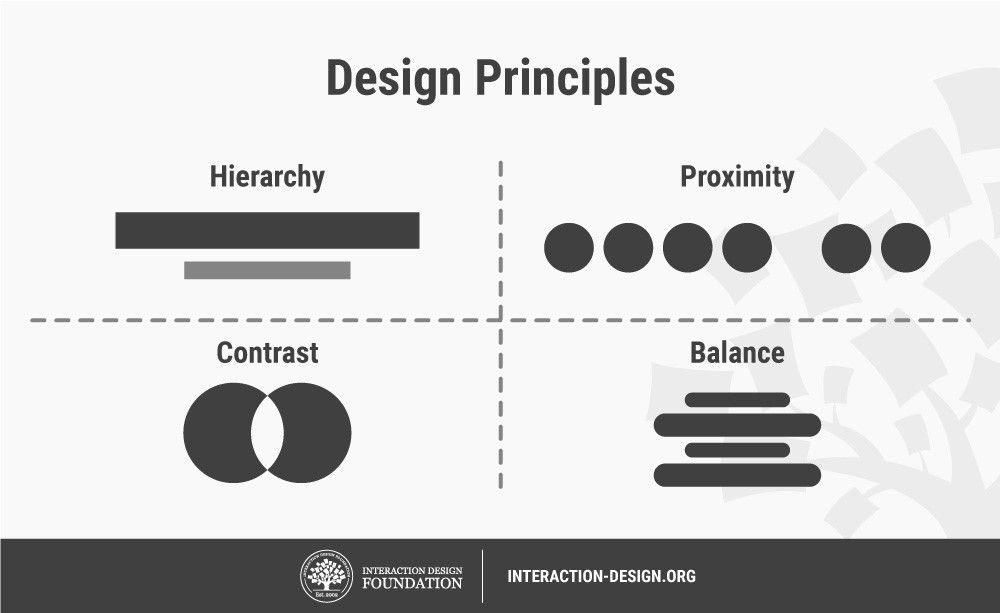
Questions
- What universal design elements do you see in software or hardware systems?
- What is meant by the term "visual hierarchy" and "proximity"?
- Choose one of Jakob's Ten Usability Hueristics and identify a deficiency in a system you interact with regularly. Describe how to improve that system according to the hueristic(s).
Explore Further
These curated resources catalog design principles you can apply immediately:
- Laws of UX — Jon Yablonski’s beautifully illustrated collection of the psychological principles behind interface design (Fitts, Hick, Jakob, Miller, aesthetic-usability, and more), each on a single page with sources. An excellent quick reference while designing your final project.
- Vox - It’s not you. Bad doors are everywhere. (video, ~5 min) — the definitive “Norman door” explainer, featuring Don Norman himself. Written summary: a door that needs a label (“PUSH”) is a design failure; affordances and signifiers should communicate operation without instruction — a standard that applies equally to buttons and links.
- Apple Human Interface Guidelines — a production design system in daily use; browse the “Foundations” section and notice how abstract principles (hierarchy, consistency, feedback) become concrete, testable rules.
- Material Design 3 — Google’s counterpart; compare its guidance to Apple’s on the same component (say, buttons or dialogs) to see how shared principles yield different, internally consistent systems.