CS377: Database Design - Object-Relational Mapping with SQLAlchemy
Activity Goals
The goals of this activity are:- To map tables to Python classes and rows to objects using SQLAlchemy declarative models
- To express relationships and joins through relationship() attributes instead of hand-written JOIN clauses
- To model class hierarchies with single-table and joined-table inheritance
- To build queries that read like Python comprehensions, and to see the SQL they generate
Supplemental Reading
Feel free to visit these resources for supplemental background reading material.The Activity
Directions
Consider the activity models and answer the questions provided. First reflect on these questions on your own briefly, before discussing and comparing your thoughts with your group. Appoint one member of your group to discuss your findings with the class, and the rest of the group should help that member prepare their response. Answer each question individually from the activity, and compare with your group to prepare for our whole-class discussion. After class, think about the questions in the reflective prompt and respond to those individually in your notebook. Report out on areas of disagreement or items for which you and your group identified alternative approaches. Write down and report out questions you encountered along the way for group discussion.Model 1: Queries as Comprehensions
| Python list comprehension | [p.name for p in people if p.age > 30] |
|---|---|
| SQLAlchemy query | session.scalars(select(Person.name).where(Person.age > 30)) |
| Generated SQL | SELECT person.name FROM person WHERE person.age > 30 |
Questions
- Line up the three rows of the table: which part of the comprehension plays the role of
SELECT? OfFROM? OfWHERE? - The comprehension filters in Python, after fetching everything; the query filters in the database. For a table of ten million people, why is that difference decisive?
- In
Person.age > 30,Person.ageis a class attribute, not a number — so>doesn't returnTrueorFalse. What must SQLAlchemy be doing with the>operator to make this work? (Hint: Python lets classes overload operators.)
Model 2: From Raw SQL to the ORM
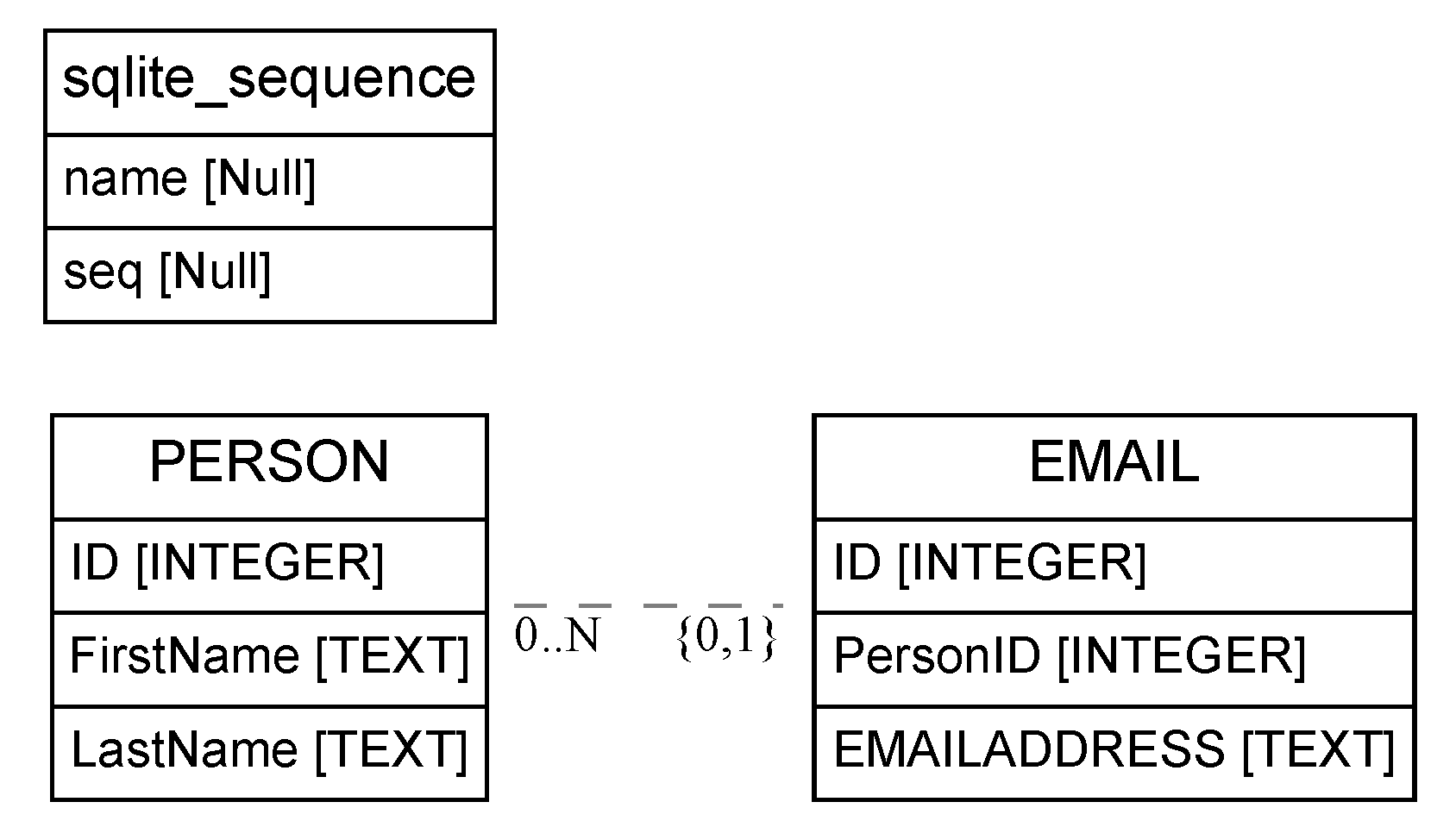
Questions
- The embedded example creates
PERSONandEMAILtables with raw SQL strings and a helperquery()function. Rewrite its schema as SQLAlchemy declarative classes: which parts of theCREATE TABLEstrings becomemapped_columndefinitions, and which becomerelationship()attributes? - In the raw version, inserting a person and their email address takes two
INSERTstatements and a hand-carried foreign key. How does the ORM version (person.emails.append(Email(...))) accomplish the same thing? Who fills in the foreign key? - What does the raw version have to do to prevent SQL injection, and what does the ORM version do about it?
- When might you still drop down to raw SQL even in an ORM project? Name a query from this course that would be awkward to express through the ORM.
Embedded Code Environment
You can try out these code examples in a development environment of your choice! Note that some embedded projects have multiple source files; you can see those by clicking the appropriate file tab to open that file.Why an ORM?
Our database programs so far live a double life: the database thinks in tables and rows, while Python thinks in classes and objects, and we hand-translate between them — building SQL strings, unpacking result tuples by position, carrying foreign keys around by hand. An Object-Relational Mapper (ORM) automates that translation. SQLAlchemy is Python’s most widely used ORM: you declare classes, and it generates the CREATE TABLE, INSERT, SELECT, and JOIN statements for you — with parameters properly escaped, rows returned as real objects, and relationships navigable as attributes.
The ORM is the middle layer of the database interface stack: underneath, it still speaks DB-API SQL (you can watch it do so with echo=True); above, your program stays object-oriented.
Install it with pip install sqlalchemy (version 2.x is assumed below).
Declarative Models: Tables as Classes
A declarative model is a class whose attributes describe columns. Here is the Person/Email schema from our earlier raw-SQL work, declared instead:
from sqlalchemy import create_engine, ForeignKey, select
from sqlalchemy.orm import (DeclarativeBase, Mapped, mapped_column,
                            relationship, Session)

class Base(DeclarativeBase):
    pass

class Person(Base):
    __tablename__ = "person"
    id: Mapped[int] = mapped_column(primary_key=True)
    name: Mapped[str]
    age: Mapped[int]
    emails: Mapped[list["Email"]] = relationship(back_populates="person")

class Email(Base):
    __tablename__ = "email"
    id: Mapped[int] = mapped_column(primary_key=True)
    address: Mapped[str]
    person_id: Mapped[int] = mapped_column(ForeignKey("person.id"))
    person: Mapped["Person"] = relationship(back_populates="emails")

engine = create_engine("sqlite:///people.db", echo=True)  # echo prints the SQL!
Base.metadata.create_all(engine)   # issues the CREATE TABLE statements
Read the correspondence line by line:
| Relational concept | Declarative equivalent |
|---|---|
table person |
class Person(Base) with __tablename__ |
| column with type | name: Mapped[str] (type annotation → column type) |
PRIMARY KEY |
mapped_column(primary_key=True) |
FOREIGN KEY (person_id) REFERENCES person(id) |
mapped_column(ForeignKey("person.id")) |
| the join you’d write to get a person’s emails | relationship() — see below |
relationship(): Joins as Attributes
The emails/person pair of relationship() attributes is the payoff. Insert related rows without ever touching a foreign key:
with Session(engine) as session:
    ada = Person(name="Ada", age=36)
    ada.emails.append(Email(address="ada@example.com"))
    ada.emails.append(Email(address="lovelace@example.com"))
    session.add(ada)     # the Email objects come along automatically
    session.commit()     # INSERT person; INSERT email x2, with person_id filled in
And navigate them without writing a JOIN:
print([e.address for e in ada.emails])   # the ORM joins/loads behind the scenes
# ['ada@example.com', 'lovelace@example.com']
print(ada.emails[0].person.name)         # and back the other way
# 'Ada'
back_populates keeps the two sides consistent: appending to ada.emails also sets that email’s .person to ada. The session is the ORM’s unit of work — it batches your object changes and flushes them as SQL when you commit() (one transaction: all or nothing, as we discussed with transactions).
Queries that Read Like Comprehensions
If you can write a Python list comprehension, you can read a SQLAlchemy query. The clauses line up one-for-one:
# comprehension over objects        # ORM query (runs in the database)
[p.name                             select(Person.name)
 for p in people                    # FROM person
 if p.age > 30]                     .where(Person.age > 30)
with Session(engine) as session:
    stmt = select(Person).where(Person.age > 30).order_by(Person.name)
    over_thirty = session.scalars(stmt).all()   # a list of Person objects
Given people Ada (36), Alan (41), and Grace (29), this prints real objects, filtered and sorted by the database:
for p in over_thirty:
    print(p.name, p.age)
Ada 36
Alan 41
More comprehension-style patterns, and the SQL each becomes:
# "emails of people named Ada" -- an implicit join through the relationship
stmt = select(Email.address).join(Email.person).where(Person.name == "Ada")
# SELECT email.address FROM email JOIN person ON person.id = email.person_id
#   WHERE person.name = ?

# aggregation: {name: number_of_emails}
from sqlalchemy import func
stmt = (select(Person.name, func.count(Email.id))
        .join(Person.emails)
        .group_by(Person.name))
# SELECT person.name, count(email.id) FROM person JOIN email ... GROUP BY person.name
Because Person.age > 30 builds a SQL expression object (via operator overloading) rather than evaluating to a boolean, the filtering happens in the database, not in Python — the comprehension’s readability with the database’s efficiency. That distinction is the whole point: never fetch a million rows to keep three.
Modeling Inheritance
Objects have subclasses; tables don’t. Suppose our design calls for a Person superclass with Student and Instructor subclasses. SQLAlchemy offers two standard translations, and choosing between them is a schema-design decision like any other:
Single-table:  person(id, name, type, major, office)   <- one wide table,
                                                            unused fields NULL
Joined-table:  person(id, name, type)
               student(id -> person.id, major)          <- one table per class,
               instructor(id -> person.id, office)         joined by primary key
Single-Table Inheritance
Everything lives in one table; a discriminator column records each row’s class, and subclass-specific columns are simply NULL for other classes:
class Person(Base):
    __tablename__ = "person"
    id: Mapped[int] = mapped_column(primary_key=True)
    name: Mapped[str]
    type: Mapped[str]   # the discriminator: 'person', 'student', or 'instructor'
    __mapper_args__ = {"polymorphic_identity": "person", "polymorphic_on": "type"}

class Student(Person):
    major: Mapped[str] = mapped_column(nullable=True)
    __mapper_args__ = {"polymorphic_identity": "student"}

class Instructor(Person):
    office: Mapped[str] = mapped_column(nullable=True)
    __mapper_args__ = {"polymorphic_identity": "instructor"}
After session.add_all([Student(name="Ada", major="CS"), Instructor(name="Bill", office="PFA 106G")]), the single person table holds:
| id | name | type | major | office |
|---|---|---|---|---|
| 1 | Ada | student | CS | NULL |
| 2 | Bill | instructor | NULL | PFA 106G |
Queries are fast (no joins), but the table denormalizes as subclasses multiply — every subclass’s fields pad every other subclass’s rows with NULLs.
Joined-Table Inheritance
Give each subclass its own table, sharing the superclass’s primary key:
class Student(Person):
    __tablename__ = "student"
    id: Mapped[int] = mapped_column(ForeignKey("person.id"), primary_key=True)
    major: Mapped[str]
    __mapper_args__ = {"polymorphic_identity": "student"}
Now a Student row is split across two tables, and loading one silently performs the join:
person |
student |
||||
|---|---|---|---|---|---|
| id | name | type | id | major | |
| 1 | Ada | student | 1 | CS |
stmt = select(Student).where(Student.major == "CS")
# SELECT ... FROM person JOIN student ON person.id = student.id WHERE student.major = ?
Either way, a polymorphic query over the superclass returns the right subclasses:
for p in session.scalars(select(Person)):
    print(type(p).__name__, p.name)
Student Ada
Instructor Bill
Choosing: single-table favors query speed and simplicity when subclasses are few and share most fields; joined-table favors normalization (no NULL padding, subclass constraints enforceable) at the cost of a join per load. This is the update/deletion-anomaly reasoning from our normalization work, resurfacing at the object layer.
Common Pitfalls
- Forgetting to
commit(). The session queues your changes; without a commit, they vanish with the session (and other connections never see them). - Filtering in Python out of habit.
[p for p in session.scalars(select(Person)) if p.age > 30]fetches every row; put the condition in.where()so the database does the work. - The N+1 query problem. Looping over people and touching
p.emailsinside the loop issues one query per person. For bulk work, ask for the join up front (select(Person).options(selectinload(Person.emails))). - Treating the ORM as magic. It’s generating SQL you already know how to read — create your engine with
echo=Truewhile learning, and check that the SQL is what you would have written.