CS377: Database Design - Data Modeling and the Join
Activity Goals
The goals of this activity are:- To model table joins
- To differentiate between the different type of joins
- To identify potential anomalies in data schemas
- To take steps to normalize data schemas to avoid anomalies
Supplemental Reading
Feel free to visit these resources for supplemental background reading material.The Activity
Directions
Consider the activity models and answer the questions provided. First reflect on these questions on your own briefly, before discussing and comparing your thoughts with your group. Appoint one member of your group to discuss your findings with the class, and the rest of the group should help that member prepare their response. Answer each question individually from the activity, and compare with your group to prepare for our whole-class discussion. After class, think about the questions in the reflective prompt and respond to those individually in your notebook. Report out on areas of disagreement or items for which you and your group identified alternative approaches. Write down and report out questions you encountered along the way for group discussion.Model 1: Relational Design
Questions
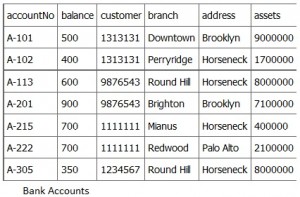
- What data redundancies do you see in this table, and how can you fix each?
- How would you change the address of a bank? Remove a bank? Insert a new account an an existing back, but with an updated address? These are update anomalies, deletion anomalies, and insertion anomalies.
- Design a schema that eliminates data redundancy in this table.
Model 2: Case Study
Questions
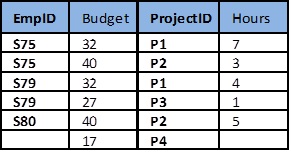
- Induce as many anomalies as you can in the flawed table above!
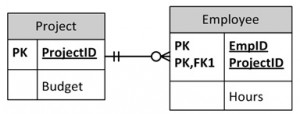
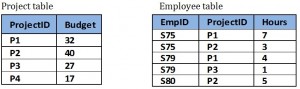
- How does the improved (normalized) schema help prevent the anomalies you were able to identify?
Model 3: The SQL Join
Inner Join

Left Outer Join

Questions
- Joins are classified by which records are included if a corresponding match is not found in one table. An inner join includes only records that match across both tables. A left outer join includes all rows from the first table and their corresponding match from the second table (or
NULLif no match exists from the second table. What do you think a right outer join is, and a full outer join? - What records are included in an inner join, a left outer join, a right outer join, and a full outer join, for this data table? Write the SQL
JOINstatements required to implement each join by linking theDepartmentIDcolumn.
Facilitating Integrity with Modeling and the SQL Join
In the field of database management, ensuring data integrity is of utmost importance. Data integrity refers to the accuracy, consistency, and reliability of data stored in a database. One of the ways to facilitate data integrity is through the use of modeling and the SQL Join operation.
SQL Joins
A SQL Join is a powerful operation that combines rows from two or more tables based on a related column between them. It allows data from multiple tables to be retrieved and combined in a meaningful way. The result of a join is a new table, also known as a result set, that combines rows from the joined tables based on a specified condition. The condition is typically the equality between the values in the related columns.
The Wikipedia article on SQL Joins provides a comprehensive introduction to the topic. It explains various types of joins, including inner join, left join, right join, and outer join, along with their semantics and practical examples. This article serves as an excellent starting point for understanding SQL joins and their applications.
A Step-by-Step Join Walkthrough
Joins are easiest to understand by tracing them by hand on tiny tables. We’ll use two tables throughout: an Employee table and a Department table, related through the DeptID column. Notice the deliberate mismatches: Grace has no department (NULL), and no employee works in Marketing (DeptID 40).
Employee (the “left” table):
| Name | DeptID |
|---|---|
| Ada | 10 |
| Grace | NULL |
| Alan | 20 |
| Edsger | 20 |
Department (the “right” table):
| DeptID | DeptName |
|---|---|
| 10 | Engineering |
| 20 | Research |
| 40 | Marketing |
The mental procedure for any join is the same three steps:
- Pair up rows. For each row of the left table, scan the right table for rows whose join column matches (
Employee.DeptID = Department.DeptID). - Keep the matches. Every matching pair becomes one output row containing columns from both tables.
- Decide what to do with the leftovers. Rows that matched nothing are where the join types differ — this is the only place they differ.
Inner Join: matches only
SELECT e.Name, e.DeptID, d.DeptName
FROM Employee e
INNER JOIN Department d ON e.DeptID = d.DeptID;
Trace it row by row: Ada (10) matches Engineering — keep. Grace (NULL) matches nothing (NULL never equals anything, not even NULL!) — discard. Alan (20) and Edsger (20) each match Research — keep both. Marketing never matched — discard.
| Name | DeptID | DeptName |
|---|---|---|
| Ada | 10 | Engineering |
| Alan | 20 | Research |
| Edsger | 20 | Research |
Left Outer Join: matches, plus every left row
SELECT e.Name, e.DeptID, d.DeptName
FROM Employee e
LEFT JOIN Department d ON e.DeptID = d.DeptID;
Same three matched rows as before, but now the leftover left row (Grace) is kept, padded with NULL for the right table’s columns:
| Name | DeptID | DeptName |
|---|---|---|
| Ada | 10 | Engineering |
| Grace | NULL | NULL |
| Alan | 20 | Research |
| Edsger | 20 | Research |
Use a left join when the question is “show me every employee, with their department if they have one.”
Right Outer Join: matches, plus every right row
SELECT e.Name, e.DeptID, d.DeptName
FROM Employee e
RIGHT JOIN Department d ON e.DeptID = d.DeptID;
Now the unmatched right row (Marketing) is kept instead, padded with NULL on the employee side:
| Name | DeptID | DeptName |
|---|---|---|
| Ada | 10 | Engineering |
| Alan | 20 | Research |
| Edsger | 20 | Research |
| NULL | NULL | Marketing |
A right join is just a left join with the tables swapped: A RIGHT JOIN B returns the same rows as B LEFT JOIN A. (Older versions of SQLite — before 3.39, released in 2022 — had no RIGHT JOIN or FULL OUTER JOIN, for exactly this reason: a right join can always be rewritten as a swapped left join, and a full outer join can be emulated by UNIONing a left join with the right side’s unmatched rows. If a join keyword errors out in your environment, check the dialect version before checking your syntax.)
Full Outer Join: matches, plus every leftover from both sides
SELECT e.Name, e.DeptID, d.DeptName
FROM Employee e
FULL OUTER JOIN Department d ON e.DeptID = d.DeptID;
| Name | DeptID | DeptName |
|---|---|---|
| Ada | 10 | Engineering |
| Grace | NULL | NULL |
| Alan | 20 | Research |
| Edsger | 20 | Research |
| NULL | NULL | Marketing |
One Table to Rule Them All
The four join types differ only in which unmatched rows survive:
| Join type | Matched pairs | Unmatched left rows (Grace) | Unmatched right rows (Marketing) |
|---|---|---|---|
INNER JOIN |
kept | dropped | dropped |
LEFT JOIN |
kept | kept (NULL-padded) | dropped |
RIGHT JOIN |
kept | dropped | kept (NULL-padded) |
FULL OUTER JOIN |
kept | kept (NULL-padded) | kept (NULL-padded) |
Reasoning About Join Order
With two tables, order only matters for outer joins (which side is “kept”?). With three or more tables, joins are evaluated left to right — each join’s result becomes the left input of the next — and the order in which you introduce outer joins can change the answer. Consider adding a Building table and asking for every employee, their department, and that department’s building:
SELECT e.Name, d.DeptName, b.BuildingName
FROM Employee e
LEFT JOIN Department d ON e.DeptID = d.DeptID
LEFT JOIN Building b ON d.BuildingID = b.BuildingID;
Step through it:
Employee LEFT JOIN Departmentkeeps all four employees; Grace’s department columns areNULL.- That intermediate result is then left-joined with
Building. Grace’sd.BuildingIDisNULL, so she matches no building — but the left join keeps her anyway, with aNULLbuilding.
Had we written INNER JOIN Building in step 2, Grace would be silently dropped even though the first join carefully preserved her — a classic pitfall: an inner join later in the chain can undo an outer join earlier in the chain. When mixing join types, ask of each unmatched row: “does the next join keep me or drop me?”
For inner joins, order does not change the result (joins are associative and commutative in that case) — but it can change performance. Query optimizers reorder inner joins to start with the smallest intermediate results; we will revisit this when we discuss query planning and indexing.
Common Pitfalls
- Forgetting the join condition (
ON ...) produces a cross join: every left row paired with every right row (4 × 3 = 12 rows here) — usually a bug, and enormous on real tables. NULLnever matches. Grace’sNULLDeptID does not join to anything, even anotherNULL. Filtering an outer join’sNULL-padded columns in aWHEREclause (e.g.,WHERE d.DeptName = 'Research') silently turns it back into an inner join; put such conditions in theONclause if you mean to keep unmatched rows.- Duplicate matches multiply. If two rows on each side share a key, you get 2 × 2 = 4 output rows. Joining on a non-key column is the usual culprit when a query “invents” rows.