CS274: Computer Architecture - The Stack
Activity Goals
The goals of this activity are:- To explain the direction in which the stack grows
The Activity
Directions
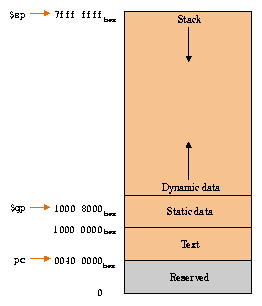
Consider the activity models and answer the questions provided. First reflect on these questions on your own briefly, before discussing and comparing your thoughts with your group. Appoint one member of your group to discuss your findings with the class, and the rest of the group should help that member prepare their response. Answer each question individually from the activity, and compare with your group to prepare for our whole-class discussion. After class, think about the questions in the reflective prompt and respond to those individually in your notebook. Report out on areas of disagreement or items for which you and your group identified alternative approaches. Write down and report out questions you encountered along the way for group discussion.Model 1: The MIPS Stack
Questions
- In which direction does the stack grow? Why do you think this is? In other words, why not have it grow in the same direction as the heap?
- What MIPS instructions would save a value to the stack? How would you save two values to the stack?
- Suppose a function
f1saves three values to the stack, and then calls a functionf2which saves two more values to the stack. What does the stack look like, and where does the stack pointer point, after each function call? - Does
f1and/orf2need to save the return address registerrato the stack? Why or why not? - Write a program that calls a procedure, that then calls another procedure, saving registers to the stack along the way. Diagram your call stack and share it with the class.
Model 2: Key Formulas and Concepts Recap
A one-page summary of the stack.
Key rules:
| Rule | Micro-example |
|---|---|
| The stack grows DOWNWARD, from high addresses toward low ones; the heap grows upward toward it. | If $sp = 0x7FFFEFFC, pushing moves it to 0x7FFFEFF8 |
Push one word: subtract 4 from $sp, then store. |
addi $sp, $sp, -4 then sw $s0, 0($sp) |
Pop one word: load, then add 4 back to $sp. |
lw $s0, 0($sp) then addi $sp, $sp, 4 |
| Push n registers at once: subtract 4n, then store at offsets 0, 4, 8, ... | Two values: addi $sp, $sp, -8; sw $s0, 0($sp); sw $s1, 4($sp) |
Last in, first out: restore in the reverse order you saved, and leave $sp exactly where you found it. |
A procedure that does -8 on entry must do +8 before jr $ra |
Save $ra on the stack whenever your procedure calls another one (including itself). |
If f1 calls f2, f1 saves $ra; a leaf procedure like f2 need not |
Memory map and a two-call stack (f1 pushes three words, then calls f2, which pushes two more):
high addresses
+---------------------+  0x7FFFFFFF-ish
|  stack (grows down) |
|    f1: word 3       |
|    f1: word 2       |
|    f1: word 1       |   <- $sp after f1's pushes (-12)
|    f2: word 2       |
|    f2: word 1       |   <- $sp during f2 (-8 more, -20 total)
|         |           |
|         v           |
|                     |
|         ^           |
|         |           |
|  heap (grows up)    |
+---------------------+
|  data (globals)     |
+---------------------+
|  text (your code)   |
+---------------------+
low addresses
Glossary:
| Term | One-line definition |
|---|---|
| Stack | The last-in-first-out memory region used for saved registers, locals, and return addresses. |
Stack pointer ($sp) |
Register 29: always holds the address of the newest (lowest) word on the stack. |
| Push / Pop | Adding a word to the stack (move $sp down, store) / removing one (load, move $sp up). |
| Stack frame | All the words one procedure call pushed; popped as a unit when it returns. |
| Heap | The region for dynamically allocated data; grows upward, opposite the stack, so they share free space. |
| LIFO | Last in, first out: the most recently pushed word is the first one popped. |
| Word alignment | Stack pushes move $sp in multiples of 4 because registers are 4 bytes. |