CS170: Programming for the World Around Us - Turtle Maze (100 Points)
Contents
Assignment Goals
The goals of this assignment are:
- To issue instructions using the Python language to move an object on screen to the goal
The Assignment
In this icebreaker assignment, you will use the Python turtle software package to control an object on the screen. This object is called a “sprite,” which is a 2D graphic that you can move around on a screen as in a video game. In this case, the sprite is a picture of a turtle, and you will write instructions in Python to navigate that turtle through a maze.
The turtle has a number of operations that it can perform, and we will use a few of them in this assignment:
turtle.forward(100)- move the turtle forward by a certain number of dots (called “pixels”) on the screen. In this case, it will move 100 pixels straight ahead in the direction the turtle is facing.turtle.right(90)- turn the turtle to the right by a certain number of degrees. In this case, the turtle will rotate 90 degrees and face right from where it was facing before.turtle.left(90)- the opposite ofturtle.right
For example, to turn my turtle in a square with right-hand turns, I would write the following code:
# Let's walk in a square!
turtle.forward(100) # move to the right on the screen
turtle.right(90)    # turn to face downard
turtle.forward(100) # move forward down the screen
turtle.right(90)    # turn right to face left
turtle.forward(100) # move forward on the screen (to the left)
turtle.right(90)    # turn right to face up
turtle.forward(100) # move forward up the screen, to the original spot
Notice the # character on each line: this is called a comment, and we can annotate our code to tell the reader what’s going on. This won’t be seen as code by the computer, so we can write anything we want on a line following the # character.
What to Do
Getting Started with GitHub
We will use GitHub to manage and submit our work in this course. Accept the assignment invitation using the GitHub Classroom link, and clone your repository to your computer to get started. As you work, commit your changes early and often with meaningful messages, and push them before the deadline: your latest pushed commit is what is graded. If this is new to you, the Using Git and GitHub and Cloning an Assignment with GitHub Classroom modules walk you through it step-by-step.
Your Code Quality score is informed by pylint: see the Code Quality and Linting module for how to run it and read its output.
Create a New Project
First, create a new project. Create a new Python text file, and name it turtlemaze.py. Do NOT name it turtle.py since we are using a library called turtle!
Download the Maze Image
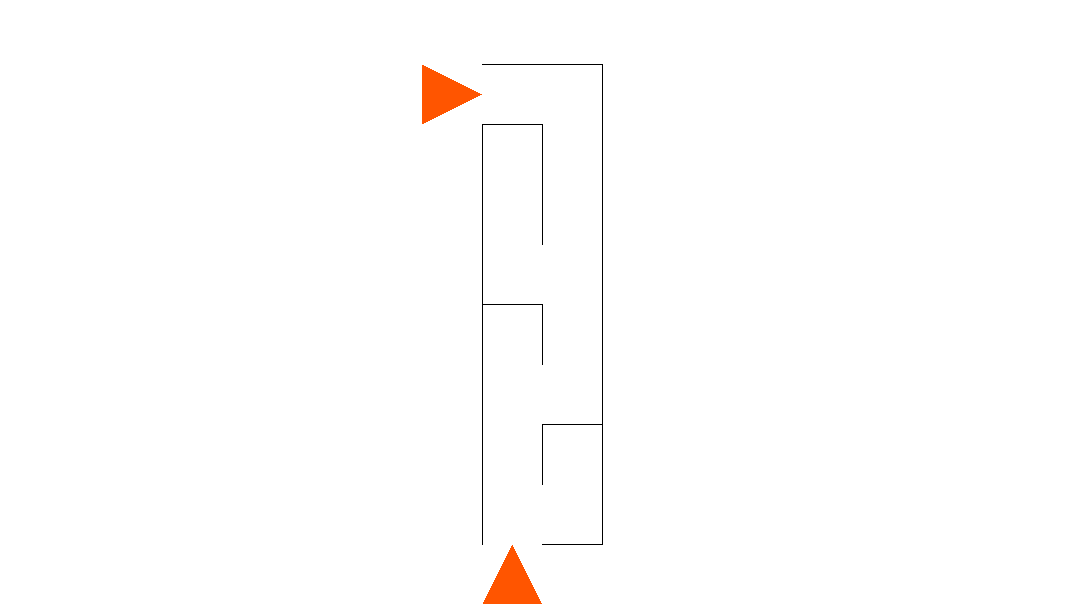
On the https://www.pythonclassroom.com/turtle-graphics/turtle-maze website, download the Problem 1 maze and save it into your new project folder. The maze can be downloaded from here.
Planning Your Solution
Write down and describe the steps you think your turtle would need to make to move from the arrow at the top of the maze to the arrow at the bottom of the maze, without going through any walls. You can use the forward, right, and left steps to do this. Don’t worry if you don’t get it right - we’ll write a program to try out our steps and revise them later! Compare your steps with a partner, and discuss until you agree.
Implement the Solution in Code!
Individually, write the code representing each step as a Python program. The template code to load the maze is given on the https://www.pythonclassroom.com/turtle-graphics/turtle-maze website. This code loads the maze image onto the screen and puts the turtle in the right place for you to start moving around. You will paste this code into your program, and add your steps in under the line that says # write your code below. For reference, here is a copy of that code:
# From https://www.pythonclassroom.com/turtle-graphics/turtle-maze
import turtle
turtle.showturtle()
turtle.shape("turtle")
# load the appropriate image
turtle.bgpic('maze1.png')
turtle.penup()
# bring the turtle to the starting point
turtle.goto(-70, 210)
turtle.pendown()
turtle.pencolor("red")
# write your code below


# press enter in the Terminal to exit the program
input()
Testing Your Program
Run your program. Did it work? Compare your result with your partner, and decide on any changes you need to make as a pair. Then, implement those changes together on one of your projects until you get it right. Once you do, go ahead and make the revisions on the other partner’s program.
Complete the Remaining Mazes
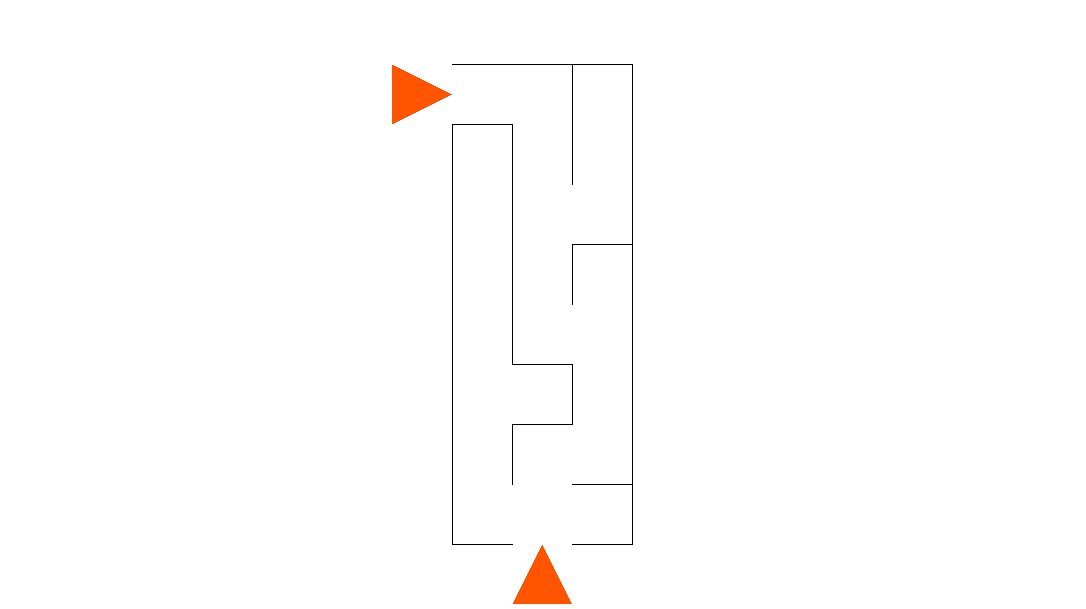
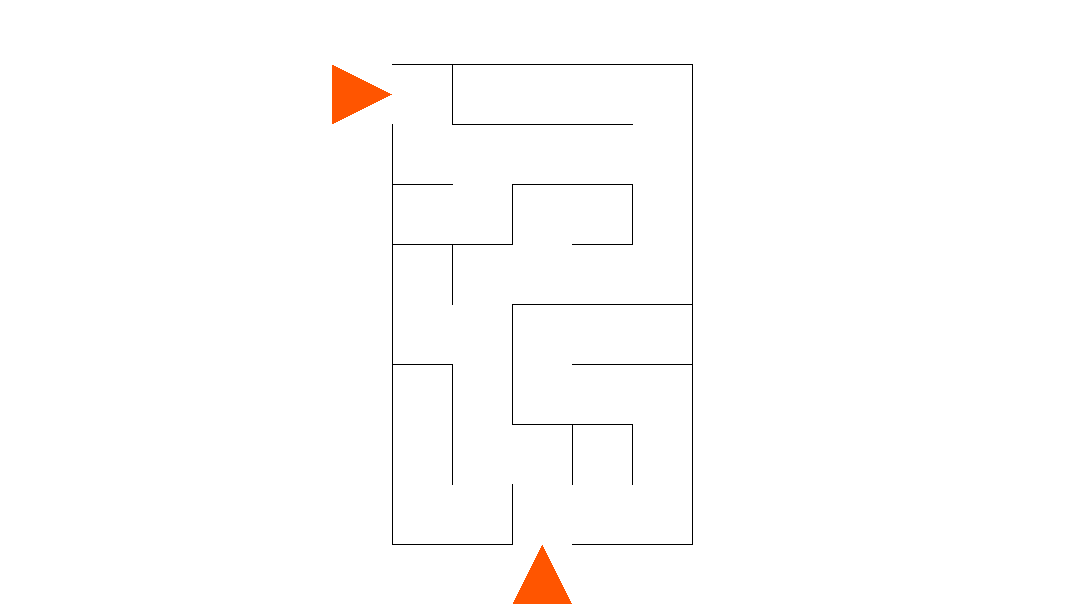
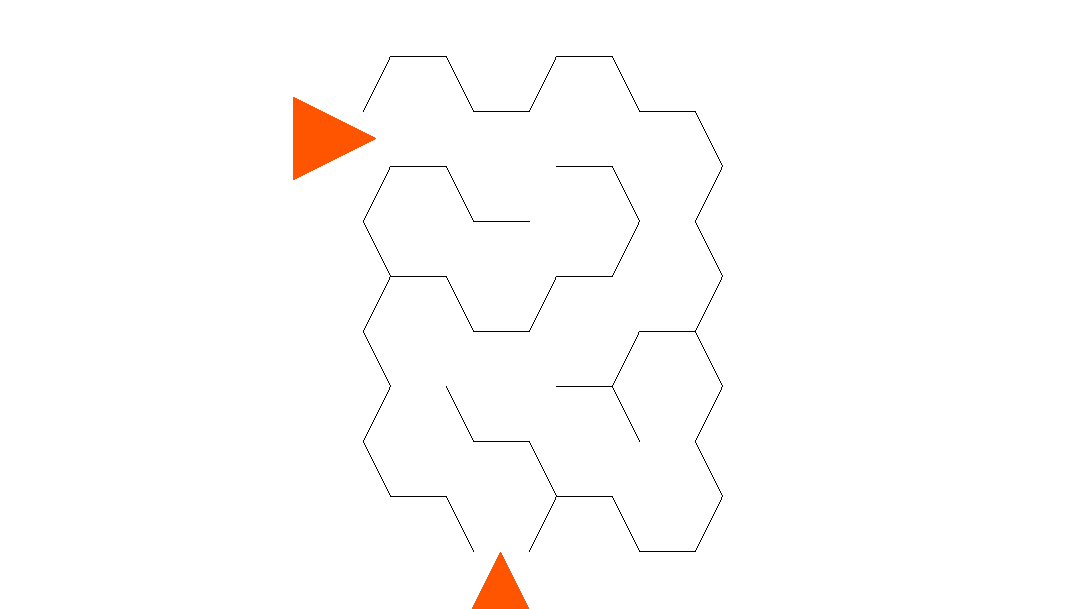
Create a new Python file in the same project, and repeat the process with the mazes in problems 2, 3, and 4. Save the maze image as maze2.png, maze3.png, and maze4.png, and update your code to open this file instead of maze1.png. Here are links to maze2, maze3, and maze4. If your turtle is not at the beginning of the maze when you first run the program, you can update the line that says turtle.goto(-70, 210) to move it to the proper place!
Extra Credit (10%): Generating Your Own Maze
In a paint program on your computer, generate your own maze. Exchange it with a partner, and try to solve it in a separate Python file. Submit your maze and the solution!
What to Turn In
When you’re done, write a README.md file in your repository, save all your files, and commit and push everything (your Python files, your maze images, and your README) to GitHub. There is no need to export your project to ZIP: your pushed repository is your submission, and your latest pushed commit before the deadline is what will be graded. If a Canvas submission link is posted, you may also paste your repository’s URL there as a secondary confirmation. In your README, answer any bolded questions presented on this page. In addition, write a few paragraphs describing what you did, how you did it, and how to use your program. If your program requires the user to type something in, describe that here. If you wrote functions to help solve your problem, what are they, and what do they do? Imagine that you are giving your program to another student in the class, and you want to explain to them how to use it. What would you tell them? Imagine also that another student had given you the functions that you wrote for your program: what would you have wished that you knew about how to call those functions?
Before You Submit: Self-Check
Before you submit, walk through this checklist - if you can check every box, you’re in great shape!
- Each maze program runs from top to bottom without errors when I run it fresh.
- The turtle travels from the entry arrow to the exit arrow of maze 1, 2, 3, and 4 without crossing any walls.
- I adjusted the
turtle.gotostarting position on any maze where the turtle did not begin at the entrance. - Each maze’s image file (
maze1.pngthroughmaze4.png) is saved in my repository and loaded by the matching program. - I ran my code through pylint and addressed the warnings (see the Code Quality and Linting module).
- My code has comments explaining what each group of moves does (for example, “turn the corner at the top of the maze”).
- My
README.mdanswers the bolded planning question and explains how to run each program. - I committed AND pushed my work to GitHub, and I can see my final version on github.com in my browser.
References
Submission
In your submission, please include answers to any questions asked on the assignment page, as well as the questions listed below, in your README file.
If you wrote code as part of this assignment, please describe your design, approach, and implementation in a separate document prepared using a word processor or typesetting program such as LaTeX. This document should include specific instructions on how to build and run your code, and a description of each code module or function that you created suitable for re-use by a colleague.
In your README, please include answers to the following questions:
- Describe what you did, how you did it, what challenges you encountered, and how you solved them.
- Please answer any questions found throughout the narrative of this assignment.
- If collaboration with a buddy was permitted, did you work with a buddy on this assignment? If so, who? If not, do you certify that this submission represents your own original work?
- Please identify any and all portions of your submission that were not originally written by you (for example, code originally written by your buddy, or anything taken or adapted from a non-classroom resource). It is always OK to use your textbook and instructor notes; however, you are certifying that any portions not designated as coming from an outside person or source are your own original work.
- Approximately how many hours it took you to finish this assignment (I will not judge you for this at all...I am simply using it to gauge if the assignments are too easy or hard)?
- Your overall impression of the assignment. Did you love it, hate it, or were you neutral? One word answers are fine, but if you have any suggestions for the future let me know.
- Using the grading specifications on this page, discuss briefly the grade you would give yourself and why. Discuss each item in the grading specification.
- Any other concerns that you have. For instance, if you have a bug that you were unable to solve but you made progress, write that here. The more you articulate the problem the more partial credit you will receive (it is fine to leave this blank).
- Please describe any use of outside resources you may have engaged in the completion of this assignment, including the use of generative Artificial Intelligence.
Assignment Rubric
| Description | Pre-Emerging (< 50%) | Beginning (50%) | Progressing (85%) | Proficient (100%) |
|---|---|---|---|---|
| Algorithm Implementation (90%) | The programs do not run (for example, due to a syntax error or because the maze image file name does not match the one loaded with turtle.bgpic), or the turtle does not make meaningful progress into any maze | The programs run but the turtle fails to reach the exit arrow on one or more mazes due to a logic slip such as a wrong turn angle, an incorrect forward distance, or a missing turn, and the path crosses through a wall | The turtle reaches the exit of all four provided mazes, but with a minor issue: for example, the starting turtle.goto position was not adjusted on a maze where the turtle begins outside the entrance, the path clips through a wall corner, or one maze file loads the wrong image | The turtle travels from the entry arrow to the exit arrow of all four provided mazes without crossing any walls; each maze solution is in its own Python file that loads the correct maze image, and the starting turtle.goto position has been adjusted wherever the turtle did not begin at the maze entrance |
| Writeup and Submission (10%) | No README.md is committed to the repository, or the repository is missing the Python files or maze images needed to run the programs | A README.md is committed, but it does not answer the bolded planning question (writing down and describing the steps the turtle needs to make), or the final version of the code was not pushed to GitHub before the deadline | The README.md answers the bolded planning question and describes how to run the maze programs, with a minor omission such as not saying which image file one of the programs needs | The README.md answers the bolded planning question, explains how to run each of the four maze programs and which image file each one needs, describes what you did and how in a few paragraphs, and the final version of all files is committed and pushed to GitHub |
Please refer to the Style Guide for code quality examples and guidelines.