CS170: Programming for the World Around Us - Semitone Note Generator (100 Points)
Contents
Assignment Goals
The goals of this assignment are:
- To write a Python program that implements a mathematical expression
- To obtain user input from the keyboard in a Python program
- To explore the relationship between audio pitch and frequency
The Assignment
In this assignment, you will write a program to execute a mathematical formula to calculate the frequency for a note. Specifically, we will use this formula to compute a note’s frequency some number of half-steps above or below a base frequency. Often, we use the “Concert A” frequency of 440 Hz (known as the A4 note), which you can hear on the Online Tone Generator website. If you know your base frequency (440), and the number of half-steps you wish to go above or below that frequency, you can calculate the new frequency using this formula:
\(pitch = base \times (2^{\frac{1}{12}})^{step}\)
For example, one half step above A4 is A#4 (“A sharp 4”), and its frequency of 466.16 is obtained by calculating \(pitch = base \times (2^{\frac{1}{12}})^{step} = 440 \times (2^{\frac{1}{12}})^{1} = 466.16\). Two half-steps above A4 is B4, whose frequency of 493.88 can be obtained by computing \(pitch = base \times (2^{\frac{1}{12}})^{step} = 440 \times (2^{\frac{1}{12}})^{2} = 493.88\). One half-step below A4 is G#4, whose frequency of 392 is computed via \(pitch = base \times (2^{\frac{1}{12}})^{step} = 440 \times (2^{\frac{1}{12}})^{-1} = 415.3\). You can find a table of notes and frequencies here.
What to Do
Getting Started with GitHub
Accept the assignment invitation using the GitHub Classroom link, and clone your repository to your computer to get started. As you work, commit your changes early and often with meaningful messages, and push them before the deadline: your latest pushed commit is what is graded. If this is new to you, the Using Git and GitHub and Cloning an Assignment with GitHub Classroom modules walk you through it step-by-step.
Your Code Quality score is informed by pylint: see the Code Quality and Linting module for how to run it and read its output.
Calculate the Frequency
Create a Python project and ask the user to input the base frequency and the number of half-steps you want to calculate. To get user input from the keyboard on-screen, you can use this code:
# First, print a prompt to the screen to ask the user for a value, and store what they type into a variable called base
base = input("Please enter the base frequency as a whole number (example: 440):")

# Since we know this should be a whole number, convert the variable's value to an integer
base = int(base)
Calculate the new frequency and print that value to the screen. Call your variable frequency. Verify that it is correct on the table of frequencies, and play the notes on the Online Tone Generator to hear what they would sound like when played on an instrument.
As a hint, the mathematical operators are: * to multiply, / to divide, + to add, - to subtract, and ** to raise a number to an exponent power.
Installing Required Software
In your terminal window (not in your code!), type this command and press enter, which will install some library software that we’ll use:
python3 -m pip install scipy pyaudio
If you have a Mac computer, please see my note below about a few commands you can run to install some software required by this command.
Play the Note
Download this file which contains code to play a note on your computer given its frequency. You can save it into your project folder to use it. Be sure that you see the sounds.py file in your project! At the top of your program, add this line:
# import code into my program that I can use
import sounds
Now, you can use that code to play sounds! To play a tone, write this line at the bottom of your program:
sounds.sine_tone(frequency, 1, volume=0.25) # play the given frequency for 1 seconds and 25% volume
Re-run your program and try it for a few different notes. Verify that they’re correct using the Online Tone Generator.
As the frequency increases, what happens to the pitch of the sound?
Play a Song
Create a new Python file within your project. Using the sounds.sine_tone function, play several frequency notes to put together a song. You can make up your own song, or use the table of frequencies to play a known song. For example, here’s the “alphabet song” (based on Twinkle Twinkle Little Star):
C4 C4 G4 G4 A4 A4 G4(1/2 note)
F4 F4 E4 E4 D4(1/8th note) D4(1/8th note) D4(1/8th note) D4(1/8th note) C4(1/2 note)
G4 G4 F4 (rest 1/16th note) E4 E4 D4(1/2 note)
G4(1/8th note) G4(1/8th note) G4(1/8th note) F4 (rest 1/16th note) E4 E4 D4(1/2 note)
C4 C4 G4 G4 A4 A4 G4(1/2 note)
F4 F4 E4 E4 D4 D4 C4(1/2 note)
A 1/2 note just means to play at half the duration of your other notes. You can create a variable called duration and set it to 1/2, 1/8, or 1/16 as approrpiate. All the other notes are 1/4 notes.
For fun, you might notice there is a “rest” in the song. A rest means to pause. We can actually pause our program by importing another software package into our program called time (at the top):
import time
and calling time.sleep(1/16) to pause for one sixteenth of a second.
Mixing Sounds
A chord effectively mixes to sounds together - the sound waves are added together to create a mixed wave.
In a new Python file, call this function:
sounds.dtmf_tone(350, 440, 2, volume=0.25)
Note that we put two numbers into the function for the frequency instead of just one. This will cause them to mix together. We use brackets in Python to store variables that are collections of things (for example, multiple frequencies instead of a single frequency value). Run this program; does it sound familiar? Landline telephones use mixed tones (called dual-tones) to represent each button you could push on the phone.
Using these frequency combinations, try writing a program that plays the tones for your phone number. Interestingly, if you held your computer speaker up to an old telephone and ran this program, it would actually dial that number!
| Digit | Frequency 1 | Frequency 2 |
|---|---|---|
| 1 | 697 | 1209 |
| 2 | 697 | 1336 |
| 3 | 697 | 1477 |
| 4 | 770 | 1209 |
| 5 | 770 | 1336 |
| 6 | 770 | 1477 |
| 7 | 852 | 1209 |
| 8 | 852 | 1336 |
| 9 | 852 | 1477 |
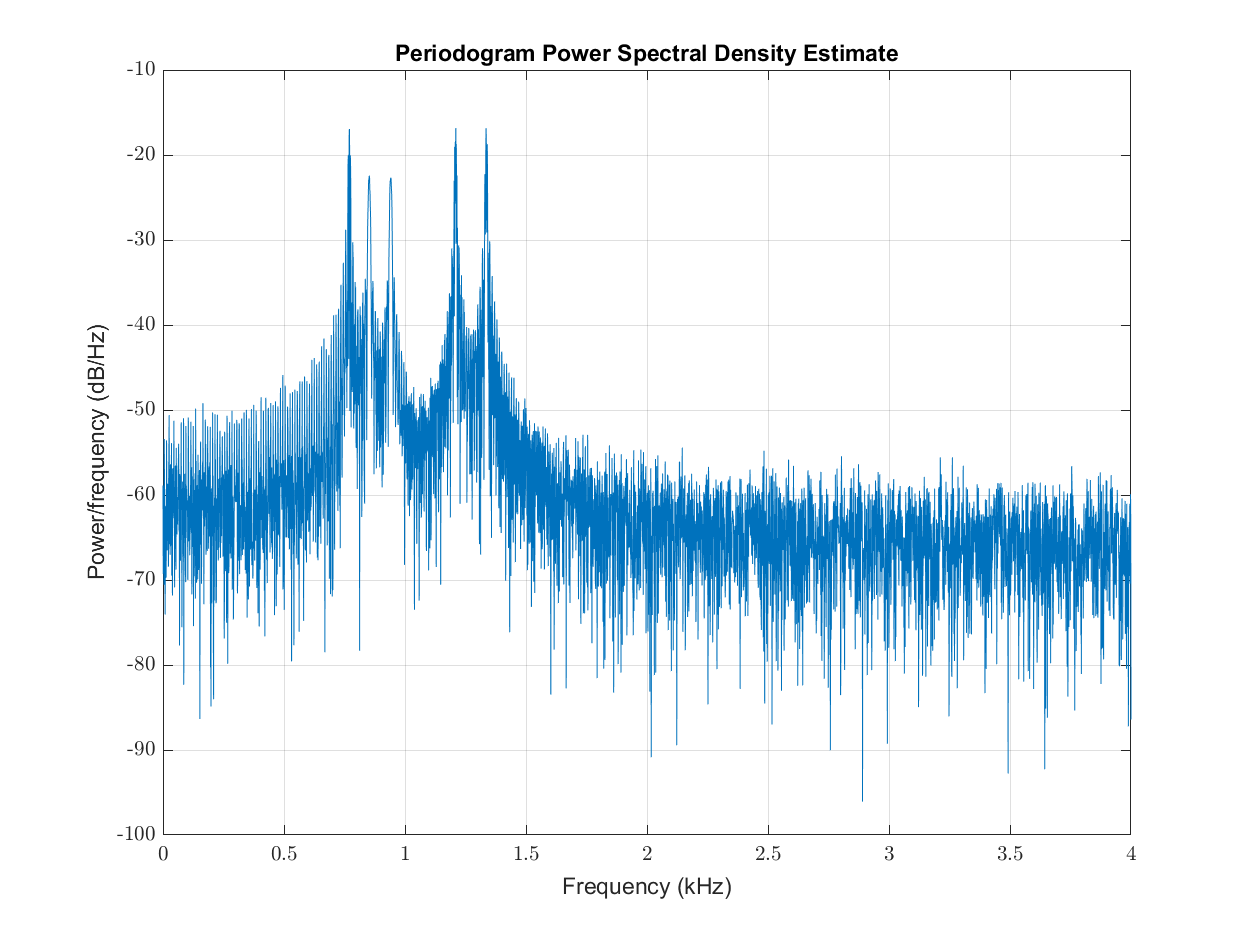
| 0 | 941 | 1336 |
If you looked at an audio sound graph like you might find on a stereo system, and saw the following output, what digit would you guess is being dialed on the phone?
What to Turn In
When you’re done, write a README.md file in your repository, save all your files, and commit and push everything (your Python files, sounds.py, and your README) to GitHub. There is no need to export your project to ZIP: your pushed repository is your submission, and your latest pushed commit before the deadline is what will be graded. If a Canvas submission link is posted, you may also paste your repository’s URL there as a secondary confirmation. In your README, answer any bolded questions presented on this page. In addition, write a few paragraphs describing what you did, how you did it, and how to use your program. If your program requires the user to type something in, describe that here. If you wrote functions to help solve your problem, what are they, and what do they do? Imagine that you are giving your program to another student in the class, and you want to explain to them how to use it. What would you tell them? Imagine also that another student had given you the functions that you wrote for your program: what would you have wished that you knew about how to call those functions?
Before You Submit: Self-Check
Before you submit, walk through this checklist - if you can check every box, you’re in great shape!
- Each program runs from top to bottom without errors when I run it fresh (including a fresh run after installing
scipyandpyaudio). - My frequency program asks for a base frequency and a number of half-steps, and its answers match the note frequency table for both positive and negative steps.
- My program plays the computed note out loud with
sounds.sine_tone, andsounds.pyis saved in my repository. - My song program plays a recognizable melody, using different durations (like 1/2 and 1/8 notes) where the song calls for them.
- My phone-number program plays the correct
dtmf_tonefrequency pair for each digit. - I ran my code through pylint and addressed the warnings (see the Code Quality and Linting module).
- Every file and function has a comment or docstring explaining its purpose, inputs, and output.
- My
README.mdanswers every bolded question on this page and explains how to run each program. - I committed AND pushed my work to GitHub, and I can see my final version on github.com in my browser.
Note: For Mac Users
If you get an error while trying to install pyaudio using the pip command above, you can execute the following commands in a Terminal window:
/bin/bash -c "$(curl -fsSL https://raw.githubusercontent.com/Homebrew/install/HEAD/install.sh)"
/opt/homebrew/bin/brew install portaudio gfortran
CFLAGS="-I/opt/homebrew/include -L/opt/homebrew/lib" python3 -m pip install scipy pyaudio
python3 -m venv .venv
source .venv/bin/activate
You may be prompted to enter your password and press enter once or twice by the first command - this is OK!
Submission
In your submission, please include answers to any questions asked on the assignment page, as well as the questions listed below, in your README file.
If you wrote code as part of this assignment, please describe your design, approach, and implementation in a separate document prepared using a word processor or typesetting program such as LaTeX. This document should include specific instructions on how to build and run your code, and a description of each code module or function that you created suitable for re-use by a colleague.
In your README, please include answers to the following questions:
- Describe what you did, how you did it, what challenges you encountered, and how you solved them.
- Please answer any questions found throughout the narrative of this assignment.
- If collaboration with a buddy was permitted, did you work with a buddy on this assignment? If so, who? If not, do you certify that this submission represents your own original work?
- Please identify any and all portions of your submission that were not originally written by you (for example, code originally written by your buddy, or anything taken or adapted from a non-classroom resource). It is always OK to use your textbook and instructor notes; however, you are certifying that any portions not designated as coming from an outside person or source are your own original work.
- Approximately how many hours it took you to finish this assignment (I will not judge you for this at all...I am simply using it to gauge if the assignments are too easy or hard)?
- Your overall impression of the assignment. Did you love it, hate it, or were you neutral? One word answers are fine, but if you have any suggestions for the future let me know.
- Using the grading specifications on this page, discuss briefly the grade you would give yourself and why. Discuss each item in the grading specification.
- Any other concerns that you have. For instance, if you have a bug that you were unable to solve but you made progress, write that here. The more you articulate the problem the more partial credit you will receive (it is fine to leave this blank).
- Please describe any use of outside resources you may have engaged in the completion of this assignment, including the use of generative Artificial Intelligence.
Assignment Rubric
| Description | Pre-Emerging (< 50%) | Beginning (50%) | Progressing (85%) | Proficient (100%) |
|---|---|---|---|---|
| Algorithm Implementation (60%) | The programs do not run (for example, due to a syntax error, or because sounds.py is missing from the project), or the frequency calculation is not implemented | The programs run but the frequency formula has a logic slip - for example, multiplying the base by the step instead of raising (2**(1/12)) to the step power, or forgetting to convert the keyboard input with int() - so the computed frequency does not match the note table | The frequency calculation matches the note table for both positive and negative half-steps and a tone plays with sounds.sine_tone, but one component is incomplete: for example, the song plays every note at the same duration instead of using 1/2 and 1/8 notes, or the phone-number program does not use the two-frequency dtmf_tone mixing from the digit table | The program reads the base frequency and number of half-steps from the keyboard, computes pitch = base * (2**(1/12))**step correctly for both positive and negative steps (matching the note frequency table), and plays the note with sounds.sine_tone; the song program plays a recognizable melody with appropriate note durations, and the phone-number program plays the correct dtmf_tone frequency pair for each digit |
| Code Indentation and Spacing (10%) | Indentation and spacing are inconsistent enough to make the programs hard to follow, or indentation errors prevent the programs from running | Indentation and spacing are mostly consistent, with a few isolated issues such as uneven spacing around the * and ** operators or inconsistent blank lines between sections | Indentation and spacing are consistent across the frequency, song, and phone-dialer files, with only a minor adjustment needed | Indentation and spacing are consistent throughout every file: statements are indented uniformly, operators are consistently spaced, and blank lines separate the input, calculation, and playback sections of each program |
| Code Quality (10%) | The code has not been run through pylint, and there are widespread style issues such as one-letter variable names or the song written as one long copy-pasted block | pylint reports several warnings that were not addressed (for example, unused imports or variables left over from experimenting), or repeated note-playing lines appear where a duration variable or loop would do | The code runs nearly clean through pylint with only one or two unaddressed warnings; names like base, steps, and frequency are descriptive snake_case, with a few isolated style issues remaining | The code follows the course style guide and runs cleanly through pylint (no warnings other than those the instructor has designated as acceptable): descriptive snake_case names such as base, steps, and frequency; no unused variables or imports; and no duplicated blocks that a variable or loop could replace |
| Code Documentation (10%) | The code contains no comments, or comments are so sparse that a reader cannot follow what each program does | Some sections are commented, but key steps such as the pitch formula or the note durations in the song are unexplained | Comments are present at each major step, but they mostly restate the code (for example, 'multiply base by the ratio') rather than explaining why the step is needed | Every file and function begins with a comment or docstring stating its purpose, inputs, and output; non-obvious steps such as the 2**(1/12) semitone ratio, the note durations, and the DTMF frequency pairs are explained; comments explain why, not just what |
| Writeup and Submission (10%) | No README.md is committed to the repository, or the repository is missing files (such as sounds.py or the song program) needed to run the project | A README.md is committed, but it does not answer the bolded questions (what happens to the pitch as frequency increases, and which digit the audio graph shows), or the final version of the code was not pushed to GitHub before the deadline | The README.md answers the bolded questions and describes how to run the programs, with a minor omission such as not saying what the user should type at each input prompt | The README.md answers both bolded questions, explains how to run each program and what to type at each input prompt, describes what you did and the functions you used, and the final version of all files is committed and pushed to GitHub |
Please refer to the Style Guide for code quality examples and guidelines.