CS170: Programming for the World Around Us - The micro:bit and Pseudorandom Number Generators
Activity Goals
The goals of this activity are:- To introduce the microbit as a programming device
- To explain why computers cannot generate truly random numbers
- To explain how computers generate pseudorandom numbers
- To explain the role of seed values in pseudorandom number generators (PRNG)
- To provide examples of mechanisms that computers use to seed PRNGs
- To develop an algorithm to generate pseudorandom numbers with a computer
- To implement an algorithm using the micro:bit blocks language
- To create and use a GitHub account to save your micro:bit MakeCode project
- To create and manipulate variables in a computer program
- To implement a mathematical formula using code
Supplemental Reading
Feel free to visit these resources for supplemental background reading material.The Activity
Directions
Consider the activity models and answer the questions provided. First reflect on these questions on your own briefly, before discussing and comparing your thoughts with your group. Appoint one member of your group to discuss your findings with the class, and the rest of the group should help that member prepare their response. Answer each question individually from the activity, and compare with your group to prepare for our whole-class discussion. After class, think about the questions in the reflective prompt and respond to those individually in your notebook. Report out on areas of disagreement or items for which you and your group identified alternative approaches. Write down and report out questions you encountered along the way for group discussion.Model 1: Random Numbers
From where we stand the rain seems random. If we could stand somewhere else, we would see the order in it.
Questions
- Pick three numbers from 1 to 10 at random, and write them on the board.
- What do you notice about the distribution of those numbers?
- How did you come up with those numbers? How did you ensure they were truly quot;random?"
- What does it mean to be "random?"
Model 2: Computers and Random Numbers
Questions
- How do computers pick numbers "at random?"
- How do they decide when to spawn certain "random" events?
- Is this video game player really good at the game?
Model 3: Pseudorandom Number Generation
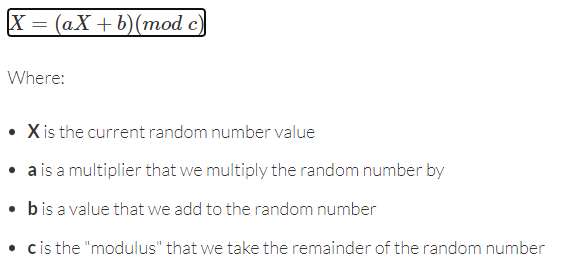

Questions
- The Linear Congruential Generator is one way to generate a pseudo-random number computationally. Choose a starting value and generate 3 random numbers using this formula.
- What would happen if two people used the same starting value (called a "seed")?
- How might video games generate a seed?
Model 4: Introduction to the micro:bit

- electrical connections
- LED output display
- radios
- compass
- accelerometer
- speakers
- light sensors
- buttons
Questions
- Using the micro:bit, create variables for a, b, c, and X: call them
multiplier,adder,modulus, andcurrent. - Give them any values you want by setting their values in
on start. - When the user presses the A button, set the value of the X variable (
current) using the formula, and show X on the screen. - Is it ok that the X variable appears on the left and the right side of the equals sign? Why or why not?
- On start, show the value of X on the screen.
- When you're done, click on the Python tab at the top. What do you notice about each block from the original program?
- Save your project to a GitHub account; you can create one for free!
Pairing the Microbit to your Computer
You can connect the micro:bit to your computer by plugging in the USB cable. However, some computers do not have a compatible mac cable. If you don’t have an adapter, your computer may support Bluetooth, a wireless protocol that you can use to connect to the micro:bit. You can do this by holding down the A and B buttons of the micro:bit, and, while holding them down, press and release the reset button. You’ll see the words “PAIRING MODE” appear on the micro:bit display. Open a bluetooth application on your computer (on the Mac, one such program is called LightBlue), and select the BBC micro:bit to pair. The micro:bit will prompt you to press the A button and a 6-digit code will appear on the screen. Type that code on your mac and you should have access to the storage of the micro:bit! You can download your code from Makecode, and then drag the .hex file from your Downloads directory to the micro:bit disk. It will restart and launch your app automatically. Here is a video describing the process on a Mac, although the process is similar on other Bluetooth enabled computers.
Notes and Walkthrough
Computers are deterministic machines: given the same instructions and the same starting information, they will do exactly the same thing every time. That’s usually a feature! But it means a computer can’t truly “pick a number at random” the way you might feel like you do. Instead, computers use a pseudorandom number generator (PRNG): a formula that produces a sequence of numbers that looks random, even though each number is completely determined by the one before it. “Pseudo” just means “sort of” or “fake” - these numbers only pretend to be random!
One classic PRNG is the Linear Congruential Generator (LCG). Don’t let the name scare you; it’s just this formula:
\(X_{next} = (a \times X_{current} + c) \bmod m\)
In plain English: take your current number, multiply it by some constant a (the multiplier), add another constant c (the adder), and then take the remainder after dividing by m (the modulus). That remainder becomes your next “random” number. The very first value of X is called the seed: it’s where the sequence starts, and anyone who uses the same seed (and the same a, c, and m) will get exactly the same sequence of “random” numbers. That’s why video games often seed their generators with something that’s different every time, like the number of milliseconds since the device powered on.
A Worked Example on the micro:bit
Here’s a complete MakeCode Python program that sets up the formula’s variables in on start, and generates (and shows) the next pseudorandom number each time you press the A button:
multiplier = 5
adder = 3
modulus = 16
current = 7  # this is our seed!

basic.show_number(current)

def on_button_pressed_a():
    global current
    current = (multiplier * current + adder) % modulus
    basic.show_number(current)
input.on_button_pressed(Button.A, on_button_pressed_a)
When this program starts, the LED display scrolls the seed value 7. Then, each time you press A, the display scrolls the next number in the sequence. Notice the line global current - because we’re changing the variable inside a function, we have to tell Python that we mean the current variable from the main program, not a brand-new one that lives only inside the function.
Tracing the Formula
Let’s trace three presses of the A button by hand, using a = 5, c = 3, and m = 16, starting from the seed 7. Tracing means playing computer: we compute each step ourselves with concrete numbers.
| Press | current before |
\(a \times X + c\) | \(\bmod~16\) (remainder) | current after (shown on screen) |
|---|---|---|---|---|
| 1 | 7 | \(5 \times 7 + 3 = 38\) | \(38 \bmod 16 = 6\) | 6 |
| 2 | 6 | \(5 \times 6 + 3 = 33\) | \(33 \bmod 16 = 1\) | 1 |
| 3 | 1 | \(5 \times 1 + 3 = 8\) | \(8 \bmod 16 = 8\) | 8 |
The sequence 7, 6, 1, 8, … looks scattered and unpredictable - but if your neighbor starts with seed 7 too, they’ll get 6, 1, 8 in exactly the same order. Also notice that the result of mod 16 is always between 0 and 15, so this generator can only ever produce numbers in that range.
Common Mistakes
- Forgetting
global: if you assign tocurrentinside a function withoutglobal current, Python quietly creates a new local variable, and your sequence never advances. - Confusing
modwith division:38 % 16is the remainder (6), not the quotient (2). - Reusing the seed: if you set
currentback to the seed inside the button handler, you’ll get the same number every press instead of a sequence. - Choosing
m = 0: you can’t take a remainder after dividing by zero - the program will crash.
Practice Exercises
All of these can be done in the MakeCode simulator without any hardware - just click the on-screen A button!
Exercise 1 (warm-up)
By hand (no computer!), trace the LCG with a = 3, c = 1, m = 10, and seed X = 4 for three steps. What three numbers do you get?
Click to reveal a solution to Exercise 1
```python # Step 1: (3 * 4 + 1) % 10 = 13 % 10 = 3 # Step 2: (3 * 3 + 1) % 10 = 10 % 10 = 0 # Step 3: (3 * 0 + 1) % 10 = 1 % 10 = 1 # The sequence is 3, 0, 1 ``` Each step feeds its answer back in as the new `X`. Because we're taking `mod 10`, every number in the sequence is a single digit from 0 to 9.Exercise 2
Type the worked example above into MakeCode and run it in the simulator. Then change only the seed (current) to a different starting value and press A a few times. Does the sequence change? Now change it back to 7 - do you get 6, 1, 8 again?
Click to reveal a solution to Exercise 2
```python multiplier = 5 adder = 3 modulus = 16 current = 12 # try a new seed here basic.show_number(current) def on_button_pressed_a(): global current current = (multiplier * current + adder) % modulus basic.show_number(current) input.on_button_pressed(Button.A, on_button_pressed_a) ``` With seed 12 you get 63 % 16 = 15, then 78 % 16 = 14, and so on - a different sequence. Returning the seed to 7 reproduces 6, 1, 8 exactly, which demonstrates why these numbers are "pseudo" random: the same seed always gives the same sequence.Exercise 3
Our generator produces numbers from 0 to 15, but suppose you want to simulate a six-sided die (numbers 1 through 6). Modify the button handler so that, after computing current, it shows (current % 6) + 1 instead. Why do we add the 1?
Click to reveal a solution to Exercise 3
```python def on_button_pressed_a(): global current current = (multiplier * current + adder) % modulus basic.show_number((current % 6) + 1) input.on_button_pressed(Button.A, on_button_pressed_a) ``` `current % 6` gives a remainder between 0 and 5, so adding 1 shifts the range to 1 through 6, just like a real die. Without the `+ 1`, you could roll a zero - and never roll a six!Exercise 4 (challenge)
Every micro:bit running the same program produces the same sequence - not very useful for games! Add an on shake event that changes the seed, for example by setting current to input.running_time() % modulus (the number of milliseconds since the program started). Why does this make the sequence hard to predict?