CS170: Programming for the World Around Us - Hide and Seek with the micro:bit
Activity Goals
The goals of this activity are:- To use the radio interface of the micro:bit
- To design a workflow and algorithm to play Hide and Seek with two micro:bit devices
- To implement an algorithm using the micro:bit block language
- To create button events using the micro:bit
- To use
ifstatements to make decisions in a program
The Activity
Directions
Consider the activity models and answer the questions provided. First reflect on these questions on your own briefly, before discussing and comparing your thoughts with your group. Appoint one member of your group to discuss your findings with the class, and the rest of the group should help that member prepare their response. Answer each question individually from the activity, and compare with your group to prepare for our whole-class discussion. After class, think about the questions in the reflective prompt and respond to those individually in your notebook. Report out on areas of disagreement or items for which you and your group identified alternative approaches. Write down and report out questions you encountered along the way for group discussion.Model 1: Hide and Seek using the micro:bit
But I still haven't found what I'm looking for.
Questions
- How do you think Tiles or Apple AirTag devices might work?
- What equipment do you think these devices require?
- What features of the micro:bit might help us locate our item? As a hint, think of the game Marco Polo.
- Develop a flowchart for the Marco Polo or Hide-and-Seek game (who says what, and who does what). For this flowchart, let's decide if we're getting "warmer" or "colder" at each step.
Model 2: Designing an Algorithm with a Flowchart and Implementing the Algorithm
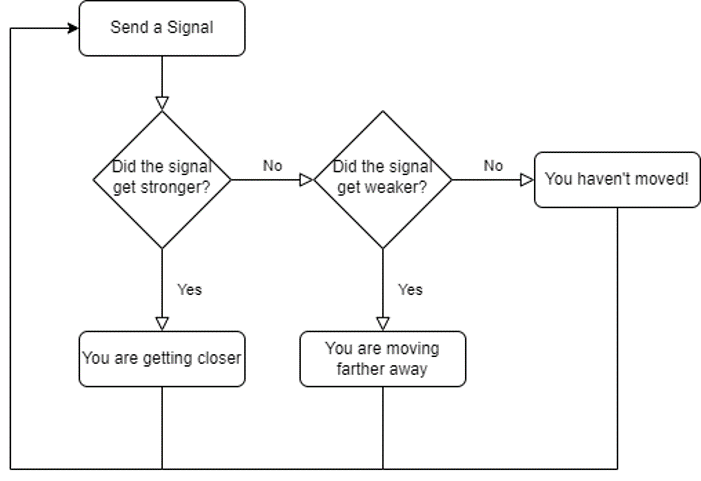
Questions
- What is unique about the diamond shapes on this flowchart?
- Using MakeCode, represent the strength of the radio signal as a variable.
- Each time you receive a radio message, copy the current signal strength to a new variable that represents the previous signal strength, so that we can compare the two to see if the current one is stronger (larger) or weaker (smaller). We’ll do this every time we receive a radio message (“on radio received”)
- When should you update the “previous signal strength” variable, and to what should we set it?
- What should we do if the signal is stronger or weaker?
Model 3: Enhancing the Program

Questions
- When should we send a radio signal (i.e., "Marco!")
- Should we do this over and over again, or pause in between? Why or why not?
- Which two devices are playing the Hide-and-Seek game here? How can we modify the program to allow each pair to communicate with one another without interfering with the others?
- Modify the program to set
radioNumbertoradioNumber + 1 mod 30and display theradioNumbervariable value each time the B button is pressed. - Why was it important to check if
receivedNumber = radioNumberwhen a message was received? Why was it helpful to send theradioNumberas the message? - Why did we initially set the RSSI variables to -100 on start? What would happen if we set these variables to 0 instead, or to something else?
- Modify the program to display the current signal strength value when the A+B buttons are pressed together (at the same time).
- How might you display the hot-and-cold result as a numeric value in feet or meters, rather than a generic "warmer" or "colder"? How might we figure out the best way to convert the RSSI signal value to a distance?
Notes and Walkthrough
In this activity, one micro:bit “hides” while another one “seeks” - just like the pool game Marco Polo. The hider repeatedly shouts “Marco!” over the radio (a built-in feature that lets micro:bits send wireless messages to each other), and the seeker listens. The seeker can’t hear where the message came from, but it can measure how strong the signal was when it arrived. That strength measurement is called the RSSI (Received Signal Strength Indicator). RSSI values are negative numbers, typically between about -42 (very close) and -100 (very far or barely heard). The key insight: closer to zero means closer to the hider.
So the seeker’s algorithm is simple, and it matches the flowchart above: every time a message arrives, compare the current signal strength to the previous one. If the signal got stronger (a larger number, closer to zero), you’re getting warmer; if it got weaker (a smaller, more negative number), you’re getting colder. Then save the current strength as the new “previous” value, so you’re ready for the next message.
A Worked Example
Both micro:bits need to be on the same radio group - think of a group as a channel on a walkie-talkie. Devices only hear messages sent on their own group. Here’s the hider, which just calls out every second:
radio.set_group(7)

def on_forever():
    radio.send_number(0)
    basic.pause(1000)
basic.forever(on_forever)
And here’s the seeker. Notice that we start previous_strength at -100 (the weakest possible signal), so that the very first real message will almost certainly look “warmer”:
radio.set_group(7)
previous_strength = -100
current_strength = -100

def on_received_number(receivedNumber):
    global previous_strength, current_strength
    current_strength = radio.received_packet(RadioPacketProperty.SIGNAL_STRENGTH)
    if current_strength > previous_strength:
        basic.show_arrow(ArrowNames.NORTH)   # warmer!
    elif current_strength < previous_strength:
        basic.show_arrow(ArrowNames.SOUTH)   # colder!
    previous_strength = current_strength
radio.on_received_number(on_received_number)
On the seeker’s LED display, an up arrow appears each time you move closer to the hider between messages, and a down arrow appears when you move farther away. (If the strength doesn’t change at all, the display just keeps showing whatever was there before.)
Tracing the Seeker
Let’s trace what happens as a seeker walks around the room while the hider calls out once per second. Remember: RSSI numbers closer to 0 mean a stronger signal.
| Message | previous_strength before |
current_strength (RSSI) |
Is current > previous? | Display | previous_strength after |
|---|---|---|---|---|---|
| 1 | -100 | -85 | Yes | Up arrow (warmer) | -85 |
| 2 | -85 | -70 | Yes | Up arrow (warmer) | -70 |
| 3 | -70 | -92 | No (smaller) | Down arrow (colder) | -92 |
| 4 | -92 | -60 | Yes | Up arrow (warmer) | -60 |
Between messages 2 and 3, the seeker turned and walked the wrong way - and the down arrow said so! This is why initializing previous_strength to -100 matters: if we had started it at 0, then every real message (which is always negative) would look “colder,” and the seeker would see down arrows even while walking straight toward the hider.
Common Mistakes
- Forgetting
radio.set_group(...)on both devices, or using different group numbers: the radios will never hear each other, and nothing happens. - Forgetting
globalin the event handler: without it, updatingprevious_strengthcreates a local variable, and the comparison never changes. - Updating
previous_strengthbefore comparing: if you copy the current value into the previous variable first, you’ll always compare a number to itself, and neither arrow will ever appear. - Mixing up “stronger” and “larger”: -60 is larger than -90, and it’s also stronger. With negative numbers, students often flip the comparison by accident.
Practice Exercises
Exercises 1-3 work in the MakeCode simulator - when your program uses the radio, the simulator shows a second micro:bit so you can test both sides! Exercise 4 is best with real hardware and a partner.
Exercise 1 (warm-up)
In the simulator, program a micro:bit to send the number 1 over the radio (group 5) when the A button is pressed, and to show a heart icon whenever it receives any number. Press A on one simulated micro:bit - does the heart appear on the other one?
Click to reveal a solution to Exercise 1
```python radio.set_group(5) def on_button_pressed_a(): radio.send_number(1) input.on_button_pressed(Button.A, on_button_pressed_a) def on_received_number(receivedNumber): basic.show_icon(IconNames.HEART) radio.on_received_number(on_received_number) ``` Both simulated micro:bits run the same program, so pressing A on either one makes the heart appear on the other. The `radio.set_group(5)` line is essential - without it, devices may not share a channel.Exercise 2
Modify the seeker so that pressing A+B together shows the current signal strength as a number on the display. (Hint: store the most recent RSSI in a variable when a message arrives, and just show that variable.)
Click to reveal a solution to Exercise 2
```python def on_button_pressed_ab(): basic.show_number(current_strength) input.on_button_pressed(Button.AB, on_button_pressed_ab) ``` Since `on_received_number` already saves the RSSI into `current_strength`, the button handler only needs to display it. In the simulator you can drag the two micro:bits closer together and farther apart to watch this number change!Exercise 3
Right now every pair in the room would interfere with each other. Add a radio_number variable that increases by 1 (wrapping around at 30, using % 30) each time B is pressed, shows itself on the screen, and is used as the radio group. Why does this let many pairs play at once?
Click to reveal a solution to Exercise 3
```python radio_number = 0 def on_button_pressed_b(): global radio_number radio_number = (radio_number + 1) % 30 radio.set_group(radio_number) basic.show_number(radio_number) input.on_button_pressed(Button.B, on_button_pressed_b) ``` Each pair agrees on a group number and presses B until both devices show it. Since radios only hear their own group, every pair now has a private channel - like different walkie-talkie channels in the same room.Exercise 4 (hardware + partner)
Flash the hider program onto one micro:bit and the seeker onto another (or run the combined program on both). Have your partner hide their device somewhere in the room, then use the arrows to find it. Afterward, discuss: did the arrows ever mislead you? What real-world factors (walls, bodies, metal objects) might make the RSSI jump around?
Click to reveal a solution to Exercise 4
```python # No new code needed - this exercise is about observation! # One improvement: average several readings to smooth out noise: readings_total = 0 readings_count = 0 def on_received_number(receivedNumber): global readings_total, readings_count readings_total += radio.received_packet(RadioPacketProperty.SIGNAL_STRENGTH) readings_count += 1 ``` Radio signals bounce off walls and get absorbed by people, so individual RSSI readings are noisy. Averaging a few readings before deciding "warmer" or "colder" makes the game more reliable - the same trick real devices like AirTags use.Submission
I encourage you to submit your answers to the questions (and ask your own questions!) using the Class Activity Questions discussion board. You may also respond to questions or comments made by others, or ask follow-up questions there. Answer any reflective prompt questions in the Reflective Journal section of your OneNote Classroom personal section. You can find the link to the class notebook on the syllabus.Teacher Highlights
- Teachers can set up a MakeCode Classroom environment by activating this template.